Contact
 Blogroll
 Feed
FeedUbiquity
I've not played with this much yet but it does look interesting.
Get Ubiquity at http://labs.mozilla.com/2008/08/introducing-ubiquity/.
posted by Michael @ 9:04 AM
0 Comments

"You Two! We're at the end of the universe, eh. Right at the edge of knowledge itself. And you're busy... blogging!"
— The Doctor, Utopia
I've not played with this much yet but it does look interesting.
Get Ubiquity at http://labs.mozilla.com/2008/08/introducing-ubiquity/.
posted by Michael @ 9:04 AM
0 Comments
Here's a list of the included tips:
Full details on Lifehacker.
Labels: firefox
posted by Michael @ 2:10 PM
0 Comments
 According to Seth Godin:
This is true of bloggers, of Twitter users, of Flickr users... everywhere you look, if someone is using Firefox, they're way more likely to be using other power tools online. The reasoning: In order to use Firefox, you need to be confident enough to download and use a browser that wasn't the default when you first turned on your computer.
Seth's Blog: Why downloading Firefox is like getting into college
Labels: firefox
posted by Michael @ 1:14 PM
0 Comments
Watch YouTube videos more efficiently with Better YouTube, a brand new Firefox extension that compiles our favorite YouTube Greasemonkey scripts into a single convenient package. Better YouTube smartly enlarges videos for better viewing, hides user comments, declutters the page and disables autoplay (great for vids open in a background tab.) Following in the footsteps of Better Gmail and friends, customize your online video-viewing with Better YouTube.
Exclusive Lifehacker Download: Better YouTube Firefox Extension
posted by Michael @ 9:06 AM
0 Comments
If not, you should be, IMHO. Anyway, here's two somewhat technical articles related to this topic.
Labels: firefox
posted by Michael @ 11:11 AM
2 Comments
My first peer-reviewed article "Firefox Search Plugins: Searching Your Library in the Browser" has just been published in Volume 1, Number 1 of The Journal of Web Librarianship. I'm not specifically excited over the fact that it's a peer-reviewed journal. I'm not an academic so that's not exactly a requirement for me. I've written eight previous books and dozens of articles so I'm not exactly lacking in the publication category. Yes, I'm glad to have another article published (it has been a while and no, Christie, I haven't forgotten that podcasting article we talked about at CIL) as always, but the peer-reviewed thing at this point is just fitting into that "nice, added bonus" category.
However, I do have one, not so much complaint, as a concern over this whole experience: the fact that an article I submitted to the journal back in July 2006, wasn't published until July 2007. One year for a technology article to see print. These day's that's not even vaguely fast enough. In my specific case, at the last minute (December 2006), I had to get an extra few sentences added to the beginning of the article to say that the code I'm talking about was replaced with a different code/method with the release of Firefox 2.0 but that my code would still work. (Given the opportunity I would have re-written the whole article but the process was too far along for that to happen.)
The world of peer-reviewed journals is not mine. I don't have suggestions for fixing this, nor will I spend all that much time on it. I just needed to say all this, as I'm sure I'm not the only author with these concerns.
posted by Michael @ 7:41 AM
1 Comments
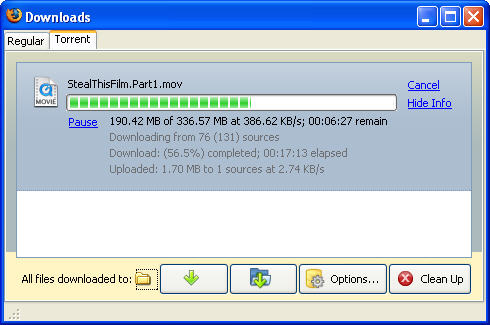
I'll stick with Azureus as it allows me to do many things to control my Torrents but for those not willing to put in the effort, try FireTorrent. This is a simple Firefox add-on that allows you to download torrents. It just adds a new "torrent" tab to the Downloads screen and takes over whenever you click on a link to a .torrent file.
Labels: bittorrent, firefox
posted by Michael @ 1:00 PM
0 Comments
I love Firefox's built-in spellchecker, especially when I'm blogging. Unfortunately, by default it only runs spellcheck in text-boxes (the form fields that allow for multiple lines of input). Well, with one small tweak of Firefox's config file you can make spellcheck work in every form field!
via kevinhasablog
Labels: firefox
posted by Michael @ 8:18 AM
3 Comments
posted by Michael @ 10:17 AM
0 Comments
Computerworld has published a list of the top 10 Firefox extensions to avoid. Usually I find a lot of use in "top 10" articles but this one was no help at all. I run six of the ten they tell me to avoid. (FasterFox, Video Downloader, PDF Download, ScribeFire, Greasemonkey, and TabBrowser Preferences) Granted most of the points they make are valid but they're hardly reasons not to use them. As some of the commenters have responded, the article seems to be geared for you mom and dad with a computer at home. If you're the person they call for help, you're perfectly safe pretty much running any of these extensions.
posted by Michael @ 10:34 AM
2 Comments
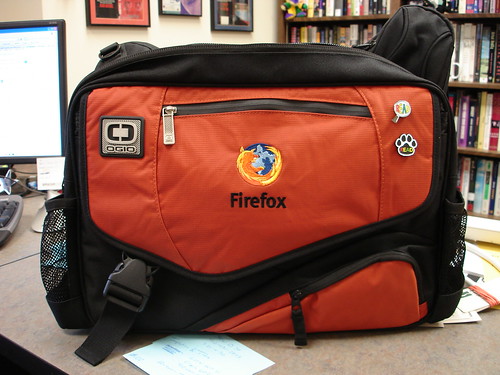
I've been wanting/needing a new laptop bag for a while and it finally arrived today. I've switched from a backpack to a messenger bag. Heck, I never used the left strap on the backpack anyway. This one holds my 17" laptop, folders, pens, notebooks, iPod, camera, and more. And I totally get some geek-cred for the embroidered Firefox logo.
posted by Michael @ 12:52 PM
3 Comments
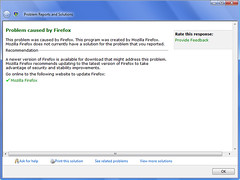
When a program crashes in Vista, the OS attempts to "find a solution" to the problem. For the first time yesterday a "solution" was found to a Firefox crash. The "solution" presented was to upgrade to the newer version of Firefox. A handy link to to the Mozilla site was even given to me. Here's the rub, I'm running the latest version of Firefox; no upgrade is available. Does Vista know something I don't? Don't get me wrong, this is all a great idea but it needs to work in order to be helpful. I was sure to click on the "Provide Feedback" link and let Microsoft know just what I thought of their "solution".
posted by Michael @ 7:56 AM
0 Comments
Don't want to leave Firefox nor actually go to the Twitter site in order to post? Try the Twitter Firefox Search Plugin which allows you to "post updates to Twitter right from your Firefox Search Bar". I've tested it and it works. The only catch is that as a result you end up going to your Twitter page. I'd rather it didn't send me anywhere but it does save a few clicks in the posting process.
posted by Michael @ 9:36 AM
0 Comments
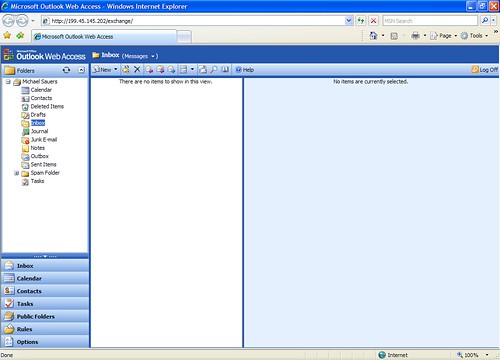
I've recently gained access to an Exchange Server-based e-mail system and was told that the Web access worked through both Firefox and IE. Well, take a look at these screenshots:
IE7
Firefox 2
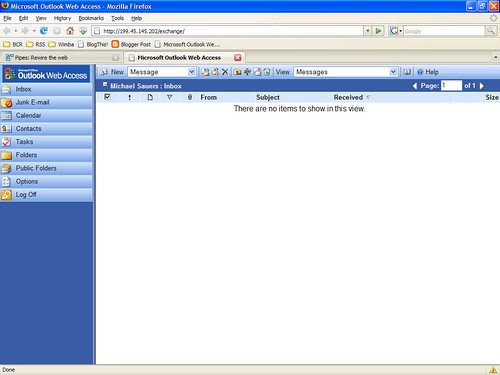
As you can see, Firefox "works" but there's more options and a smoother interface in IE. Go figure.
(I wasn't going to blog this but someone saw the screenshots in my flickr account and sent me an e-mail regarding how they'd been using Friefox for this and never thought to consider that it might work better in IE. I figured that with one person there might be others so I've shared it with you here.)
posted by Michael @ 8:46 AM
7 Comments
Did you know that there's something called Quick Find in Firefox which works like CTRL-F but automagically disappears for you? Check out this cool tip at Lifehacker.
Labels: firefox
posted by Michael @ 10:00 AM
0 Comments
Google's phishing blacklist, the one used by Firefox when you set the "check by asking Google about each site I visit" option in the security settings, is available online. It's not exactly bedtime reading but it is interesting from a technical perspective.
Labels: firefox
posted by Michael @ 10:48 AM
0 Comments
So I'm at my desk uninstalling software I no longer use from my office laptop. Windows' Add/Remove Programs lists both Firefox 1.5.x and 2.0 as installed on my computer. Since I no longer use 1.5.x I chose to uninstall it. Well, that uninstalled Firefox from my computer, which happened to be version 2.0. Yes folks, I just lost my browser. Please, whatever you do, don't tell windows to uninstall an old version of Firefox after you've upgraded to 2.0. (Luckily reinstalling 2.0 did not require me to recreate my bookmarks or reinstall any of my add-ins but I'm still annoyed by the whole escapade.)
posted by Michael @ 9:24 AM
1 Comments
Jo Haight Sarline, Denver Public Library Carson Block, Fort Collins Public Library John Sulshaw, University of Colorado-Boulder Jimmy Thomas & Susan Staples, Weld Library District Jeff Donlan, Salida Regional Library Sharon Morris, Colorado State Library
Labels: colorado, del.icio.us, DVD, firefox, marketing, second life, youtube
posted by Michael @ 5:00 PM
1 Comments
I was just listening to the latest episode of Security Now! in which it was pointed out that the new Firefox 2.0 does not have an option for automatically blocking third-party (i.e. advertisers) cookies. Looking at the Privacy options screen I was quickly able to confirm this.
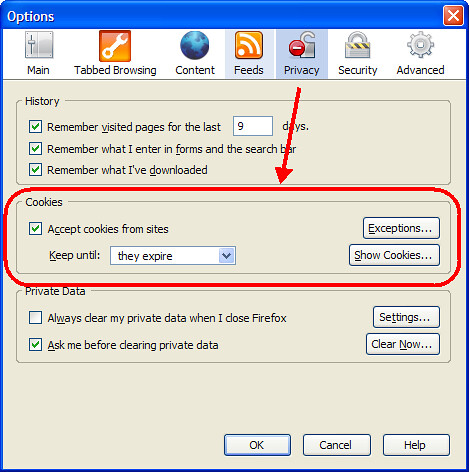
However, you can still do this but you must edit the setting manually. Here's how to do this in a few simple, illustrated steps.
First, type about:config in the address bar and then type cookie into the Filter: field. Find the line titled network.cookie.cookieBehavior, right click on it, and select Modify.

In the Enter integer value box, replace the number 0 with the number 1 and click OK.

When done, the network.cookie.cookieBehavior line will be bold, the Status will be listed as "user set" and the value will be "1". You are now blocking all third-party cookies.

Labels: firefox
posted by Michael @ 2:13 PM
2 Comments
Syndication and Website Content: Suggestions for Blogs, RSS and Internal Syndication Walter Nelson, RAND Library Webmaster
posted by Michael @ 5:33 PM
0 Comments
Stephen M. Cohen, Senior Librarian, Law Library Management, Inc.
Labels: beta, firefox, muppets, rss, slideshare, video, wikis, youtube
posted by Michael @ 5:18 PM
1 Comments
Jesse Andrews, creator of BookBurro & lead developer of Flock 1:15-2pm Beyond Browsing
Labels: del.icio.us, firefox, rss
posted by Michael @ 11:19 PM
0 Comments
I'm in Moscow, ID for the 2006 Idaho Library Association Conference. I'm here to present my Firefox Search Plugins and Tech Terms sessions and to man the BCR booth. I'll blog more as things happen but know that you can keep an eye on the flickr set that I'll be adding to over the next two days.
posted by Michael @ 8:31 PM
0 Comments
Labels: bcr, colorado, css, firefox, idaho, rss, second life
posted by Michael @ 3:15 PM
0 Comments
For those who weren't around for the browser wars here's a primer that goes all the way back to Mozilla v. Netscape and bring's everything up to date with Firefox 2.0 v. Internet Explorer 7.
Labels: firefox
posted by Michael @ 2:54 PM
0 Comments
As I promised the folks in my Blogging workshop last week, here's the screencast of how to install and use the BlogThis! bookmarklet. (It's in .swf format so you'll need to be sure you've got the latest Flash Player installed in order to view it.)
On a more technical note, I used CamStudio to create the video and convert to flash. It also wrote an HTML page for me that embedded the video, instead of linking to it like I've done here. That code looks correct and is correct based on every bit of reading I've done on the subject. However, it completely works only in IE. In Firefox I get audio but no video. Take a look at the page if you'd like to help. If anyone has any suggestions or pointers please let me know.
posted by Michael @ 7:30 PM
0 Comments
Concened about someone being able to figure out who you are based on your search queries. If you're a Firefox user (you should be by now) you can install the TrackMeNot extension which is "a low-priority background process that periodically issues randomized search-queries to popular search engines, e.g., AOL, Yahoo!, Google, and MSN. It hides users' actual search trails in a cloud of indistinguishable 'ghost' queries, significantly increasing the difficulty of aggregating such data into accurate or identifying user profiles." In other words, it submits random queries on your behalf thus obscuring which ones are your real queries. (I've been saying for years that searches on public access computers have been doing this since every person who sits down at one of those computers is searching for something different.)
Labels: firefox
posted by Michael @ 10:55 AM
0 Comments
Got this bit of news this morning...
Dear Michael,
I am pleased to inform you that your article, "Firefox Search Plugins: Searching your library in the browser," has been accepted for publication in the Journal of Web Librarianship. It will appear in Volume 1, Issue 1. I expect this issue to appear in print in late March of 2007, but since it is a first issue, there may be some flexibility about the date.
Thanks for submitting this article to JWL; I'm pleased to be able to include it in our first issue!
Sincerely,
Jody Condit Fagan
Editor, Journal of Web Librarianship
Labels: firefox
posted by Michael @ 8:18 AM
1 Comments
Open WorldCat is up and running as of today at www.worldcat.org. I've created a Firefox Search Plugin for your convienence. I've submitted it to OCLC with the hope that they'll find it worthy of adding to their WorldCat Tools page.
UPDATE 08 Aug 2006: OCLC has responded by telling me that they've created their own search plugin and will be releasing it "within the next 24 to 48 hours".
Labels: firefox
posted by Michael @ 4:58 PM
0 Comments
I've not installed it yet but this review of Firefox 2 (beta) from InformationWeek is making me consider it. Most of the features that the beta has added actually replace the plugins that I'll miss the most.
posted by Michael @ 8:47 AM
0 Comments
Mozilla Firefox 2 Beta 1 has been released. I'm actively considering not installing it as I use many of my extensions daily and don't want to loose them. So, don't expect much from me on the beta in the immediate future. Here's the official list of new features:
posted by Michael @ 10:29 AM
0 Comments
Google Browser Sync is a Firefox extension that allows you to "continuously synchronize your browser settings – including bookmarks, history, persistent cookies, and saved passwords – across your computers". Sounds like a good plan as long as you have control over all the computers involved (office and home for example) but isn't a good solution for public computers or, possibly, the reference desk. I'll continue to stick with Portable Firefox.
Labels: firefox
posted by Michael @ 11:32 AM
0 Comments
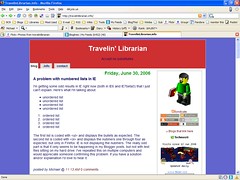
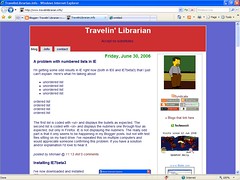
The first list is coded with <ul> and displays the bullets as expected. The second list is coded with <ol> and displays the nubmers one through four as expected, but only in Firefox. IE is not displaying the nubmers. The really odd part is that it only seems to be happening in my Blogger posts, but not with test files sitting on my hard drive. I've repeated this on multiple computers and would appreciate someone confirming this problem. If you have a solution and/or explaination I'd love to hear it.
UPDATE: As you can see, the CSS edit suggested by Steve in the comments fixed the problem. Thanks Steve!
posted by Michael @ 12:13 PM
2 Comments
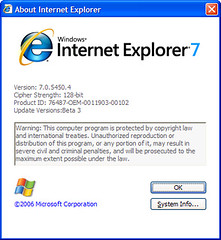 I've now downloaded and installed IE7beta3 on two computers without too much trouble. As I've mentioned previously I'm saving a full review of the process and the program itself until the final release but for now you can view the slideshow of the 84 screenshots I took during the installation and first run. If you are going to install it here are a few pointers from my experiences.
posted by Michael @ 11:21 AM
0 Comments
I preparation for writing on an article for the inaugural issue of The Journal of Web Librarianship this weekend on creating Firefox Search Plugins, I've created two new ones for TagFetch and YouTube. They can both be found on my Firefox Search Plugins page.
posted by Michael @ 11:00 PM
0 Comments
I was looking for the hours of a local Denver Public Library branch and of course, went to DPL's Web site to fine the information. I was happy to find that they're using Google Maps on the Locations & Hours page. However, when I clicked on the name of the branch I was looking for, things started to fall apart. The content, namely the branch's hours, are too long for the baloon that appears on the map. Zooming out on the map resized the baloon to fit the text but then the baloon was too tall to fit in the space allowed for tha map. (I do have an e-mail into DPL about the problem, before everyone starts whining about this post.)
A+ for the idea, C for the execution.
UPDATE 7:35pm: Here's DPL's response:
Thanks for reporting this. We had fixed this display problem for the earlier version of Firefox, but it looks like we lost it for Firefox 1.5, which is where I'm seeing the problem now. Internet Explorer displays it correctly.
We're looking into this and hope to have it fixed soon. In the meantime, you can either scroll down to see branch hours displayed in a table, or link to the specific branch page by selecting the library name at the top of the text bubble.
Revised grade: B for implementation.
posted by Michael @ 1:22 PM
1 Comments
It seems that Marlene of Marlene's corner likes my Firefox-related articles on WebJunction.Now, if I could just read the rest of her blog...
Labels: firefox
posted by Michael @ 9:03 AM
0 Comments
I often write about Firefox Search Plugins. Well, here's two new Firefox extensions that may be of some use to those of you with multiple computers.
FEBE is the Firefox Extension Backup Extension which "allows you to quickly and easily backup your Firefox extensions. In fact, it goes beyond just backing up -- It will actually rebuild your extensions individually into installable .xpi files. Now you can easily synchronize your office and home browsers."

CLEO is the Compact Library Extension Organizer which "is a Firefox extension that works with FEBE to package any number of extensions/themes into a single, installable .xpi file."
Labels: firefox
posted by Michael @ 3:41 PM
0 Comments
I've been parodied. This'll teach me to just scan the headlines. It seems that fellow CO librarian (one gracious enough to write for my issue of Colorado Libraries which should be out any day now I told,) has written a hillarious blog post titled "A biblioblogger visits the local branch library". Most of my non-librarian readers won't understand much of it but here's the best part IMHO:
BIBLIOBLOGGER: OK, well, let me run my Portable Firefox from my USB drive on one of your public-access computers...
BRANCH LIBRARIAN: We don't allow patrons to use USB drives. The IT guys won't let us. MySpace and IM are blocked, too.
BIBLIOBLOGGER: Say no more. I understand. Just give me a Google Map to the IT guy's home and I'll get Sauers to rub him out. When are people going to realize that if they don't 'get it,' they are going to 'GET IT,' know what I mean? I'm sure you are on Flickr though?"
Kudos to Steve for this one.
posted by Michael @ 8:58 AM
0 Comments
My article "Firefox Search Plugins: Sending the Library to the Patron" has been released in the April 2006 issue of MLA News, the newsletter of the Medical Library Association. (I'm sure it's been out for a while now but I just got my copies.)
Labels: firefox
posted by Michael @ 2:12 PM
0 Comments
Managing Firefox Search Plugins
The article is in PDF format but not as visually appealing as I'd like. (Totally my fault.) A revised PDF should be posted tomorrow at the same URL.
Labels: firefox
posted by Michael @ 3:23 PM
0 Comments
I've been receiving the following error from Firefox more and more often over the past month:
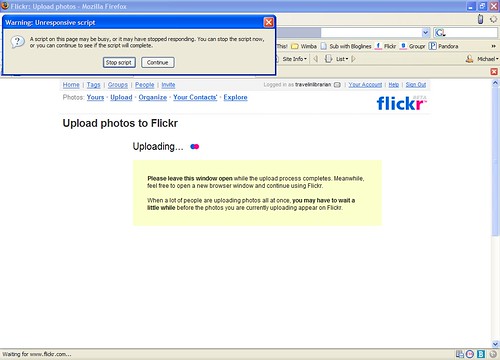
As pictured, it usually happens when uploading photos to flickr, but it has happened with other sites. I'll be uploading, eventually this error comes up, I click on the "Stop Script" button, the error disappears, and everything continues as if nothing happened. Supposedly, this is a "helpful" message that results from pages that take "too long" to load.
After some poking around, I found the following solution on lifehacker.
Labels: firefox
posted by Michael @ 2:36 PM
1 Comments
Labels: firefox
posted by Michael @ 8:46 AM
0 Comments
With my previous post on the disabling of USB drives discussion currently happening on Web4Lib, (more of which I'll probably be blogging about by the end of the week,) I was happy to see the release of the latest version of Portable Firefox just one day after Firefox released its latest update.
For those of you upgrading from a previous version, be sure to read the instructions. Upgrading this time is a bit different from previous incarnations due to some directories being relocated "for easy backups".
Labels: firefox
posted by Michael @ 8:51 PM
0 Comments
For those of you without automatic updating turned on, Firefox 1.5.0.3 is now available.
Labels: firefox
posted by Michael @ 9:54 PM
0 Comments
Well, the eFlicks article ended up being written for Public Libraries magazine but I've been in contact with the folks at WebJunction and I will be sending them an article on managing your Firefox search plugins. (Every try to delete one of those puppies, or, better yet, try to alphabetize them. This article will show you how.) It should be written shortly and edited about a week after that. Since WJ is all online, figure that the article itself should be up by the end of the month. Of course, I'll link to it here once it's available.
Labels: firefox
posted by Michael @ 2:57 PM
0 Comments
Have you ever wanted to save your own copy of a video you've seen on YouTube, Google Video, or other online video sharing service. Well, the new Firefox extension VideoDownloader allows you to do just that. One installed a new icon appears in your status bar.

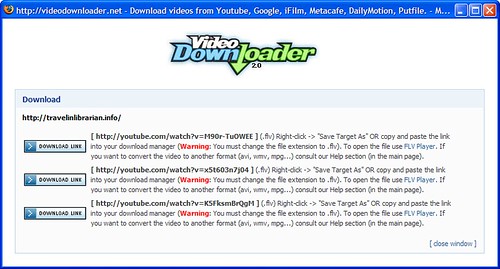
At the time of this posting there were four videos on this page. Feel free to try it out here.
posted by Michael @ 2:22 PM
0 Comments
The following was posted to Web4Lib this afternoon:
Subject: Disable USB drives on public computers
"This article provides a way to do this, while still allowing the use of USB peripherals such as mouse, keyboard or scanner. This only disables the storage drivers. This could have uses in preventing users from copying data from the computer, or running un-approved software from a portable device."
The posting also included a link to the article which itself included downloadable software to make it even easier to disable a patron's ability to use a USB drive. You may correctly assume that I'm not posting the link because I strongly disapprove of librarians doing any such thing. If you insist this is a must for your library you'll need to go find the instructions and/or tool yourself as I'll have no part in it.
The reasons for not disabling USB drive access are:
There are arguments for denying the USB of USB drives. They are:
Well there are solutions to both of these potential hazards that do not involve denying all of the legitimate uses of these devices. In the case of the first potential problem, set the computer's BIOS to only boot from the hard drive (as you should have already done to prevent people from booting from floppies,) and set a password on the BIOS to prevent anyone from changing those settings. (Again, something you should already have done. Potential problem number one solved.
As for potential problem number two; use something like Windows Dish Protection, Centurion Guard, or, my personal favorite, Deep Freeze. If someone installs something on your computer, just reboot and it's gone. Potential problem number two solved.
So, answer the question I posed in the title of this post, there's no security risk from USB drives that can't be solved in ways that won't also hurt the other 99% of your patrons.
posted by Michael @ 4:23 PM
4 Comments
Can anyone explain to me why Firefox is using nearly half-a-gig of RAM? (Luckily my home computer has a full gig or RAM.)
Labels: firefox
posted by Michael @ 9:18 PM
6 Comments
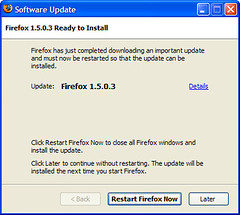
This just popped up on my screen. If you're a Firefox user and haven't seen it yet, I'm sure you will sometime over the next few days. Details about the update can be found on the Firefox Web site.
What I particularly liked about this is that I wasn't asked, it just upgraded me. Then again, I trust the Mozilla foundation so I guess that's why I'm o.k. with it. When it comes to Microsoft updates, I want full notification in advance of even downloading anything.
Update: I just checked and there's a setting to have Firefox with automatically download & install or to notify you. I belive the automatic option is the default since I don't recall ever changing it. You can find this setting under Tools|Options|Advanced|Update.
Labels: firefox
posted by Michael @ 10:29 PM
0 Comments
As expected the Firefox 2.0 alpha release, named "Bon Echo Alpha 1 Milestone", is now available for downloading. I'm going to wait for someone to report on it's stability before installing it on any of my machines. There is also a Firefox 2 wiki for those wishing to track the project.
posted by Michael @ 11:35 AM
0 Comments
posted by Michael @ 11:10 AM
0 Comments
 My only problem with using Blogger as my blogger platform is the fact that offline blogging is not as eash as it should be. Typically my options have been to use notepad and manually add the markup or use Word and clean out all the extra markup if gives me. Well, I've found a better solution, and it's something I've mentioned before: Performancing for Firefox.
posted by Michael @ 11:14 AM
1 Comments
I'm using Firefox 1.5. There is no reason for me to upgrade to IE5. Point of fact, that would be a downgrade, no matter how you look at it.
Labels: firefox
posted by Michael @ 8:57 PM
0 Comments
"Firefox 2.0, which at one point Mozilla officials said would debut in Alpha 1 format by the end of February, may appear as early as Tuesday. The browser, which will stress bookmark, tab, and extension changes, is in early development, and is scheduled for a final rollout in the third quarter."
Labels: firefox
posted by Michael @ 8:40 PM
0 Comments
Hey look! Firefox 1.5 now has automatic update notification (more than that little icon) when there's an update to the program itself. The fact that this is a .X.0.1 update is just taking software numbering to an extreme.
Labels: firefox
posted by Michael @ 8:32 AM
0 Comments


Update 1:28pm re: ConQuery comment
This is faster than ConQuery as it (a) only takes one click after the right click, (b) doesn't make me find Google in a big long list, (c) takes me directly to a map result instead of a Google result list with a link to a map, and (d) loads the new tab as the active tab, not one in the background. (Though I will admit this last one might be a quirk of my browser and not typical of others.)
Update 1:43pm
Greg's addition of the GoogleMaps search plugin solves problem (c) but still leaves me with the other three. To me "fewer clicks" = "better tool".
posted by Michael @ 9:54 AM
4 Comments
 I think I've finally found my dream blogging Firefox extension.
"Performancing for Firefox is a full featured blog editor that sits right within Firefox. Just hit F8 or click the little pencil icon at the bottom right to bring up the blog editor and easily post to your Wordpress, MovableType or Blogger blogs.
"Performancing for Firefox is for Firefox 1.5 and above only. We've made use of a number of cool new features within Firefox 1.5, so you'll need that version of Firefox to try it."
posted by Michael @ 7:52 AM
0 Comments
Well, I installed the extension and waited to receive a phishing scam. I clicked on the link and this is what I got. The "Get me out of here" link sent me to my homepage. I'd say this extension is a success.
Labels: firefox
posted by Michael @ 11:52 AM
0 Comments
Speaking of Firefox extensions, there's an extension which adds "Restart Firefox" to the File menu, simplifying the shutdown and restart process necessary to get recently installed extensions and themes to work.
Labels: firefox
posted by Michael @ 10:18 AM
2 Comments
The two new extensions are deisnged to assist with blogging (image) and block phishing sites (image).
Labels: firefox
posted by Michael @ 10:14 AM
0 Comments
The recording of my Firefox Search Plugins presentation is now avialable for your viewing pleasure. Please be sure to run the participant wizard first if you have not done so previously.
| Title: | Firefox Search Plugins 02 December 2005 |
|---|---|
| Archive ID: | BCR_Training_2005_1202_1202_31 |
| Description: | The Firefox browser has a built-in search bar allowing users to search such databases as Google, Amazon.com and Wikipedia. What many don't realize is that you can create customized searches that can be added to Firefox. This F³ session will walk you through the creation of a search plugin that, once installed, will allow your patrons to search your OPAC from within Firefox without having to access the library's site first. |
| Launcher: | http://208.185.32.63/launcher.cgi?room= BCR_Training_2005_1202_1202_31 |
| Participant Wizard: | http://208.185.32.63/wizard/launcher.cgi?wc=qt |
| Room ID: | BCR_Training |
| Archive Length: | 44:48 minutes |
| Media Format: | QuickTime |
posted by Michael @ 1:31 PM
0 Comments
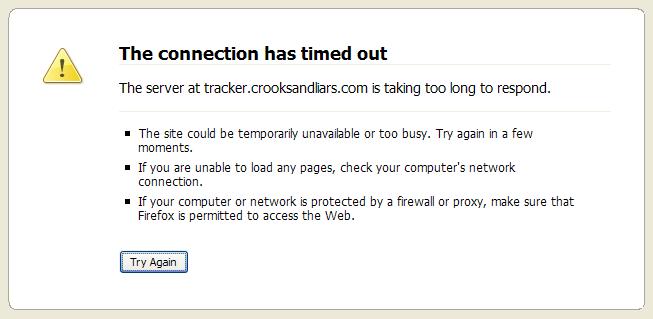
Here's the new DNS error screen in Firefox 1.5. I'm impressed. I especially like the "Try Again" button.
Labels: firefox
posted by Michael @ 8:50 AM
0 Comments
It's not yet available on the Mozilla site (at the time of this post) but you can get it from BetaNews. (Warning: Many of your extensions may not work in this new version.)
Labels: firefox
posted by Michael @ 1:29 PM
0 Comments
On December 2nd, 2005 at 10am MST I will be presenting a free, one hour webcast on creating Firefox Search Plugins. This session is limited to 25 seats and BCR members are given preference but at the moment there are still 24 seats available. (Feel free to register for one seat and then have as many people in the room as you'd like.) A full description and registration instructions can be found at http://www.bcr.org/training/online/FFF-index.html.
posted by Michael @ 9:25 AM
0 Comments
It seems that my idea to create my conference posts using OpenOffice in Linux (booting to Linux uses less battery power than booting to Windows) and then post them to blogger as MSWord files didn't work out at well as I'd hoped. Those of you using Firefox saw basically when I wanted. Those of you using IE saw some very funky code. Well, I've cleaned it all up and added the photos I had so everything should be hunky dorry now.
posted by Michael @ 11:43 AM
1 Comments
Sarah Houghton, Marin County Free Library Joe Latini & Ken Weil, South Huntington Public Library Jenny Levine, The Shifted Librarian Aaron Schmidt, Thomas Form Memorial Library I'm just going to run all of the predictions and recommendations together instead of separating them out by presenter and keep them brief. If you can't tell what the suggestion/prediction is talking about, you've got some reading to do.
posted by Michael @ 5:50 PM
0 Comments
Firefox Search Plugins: Searching Your Library in the Browser
The Firefox browser has a built-in search bar allowing users to search such databases as Google, Amazon.com, and Wikipedia. What many don’t realize is that you can create customized searches that can be added to Firefox. This free WebLive session will walk you through the creation of a search plugin which, once installed, will allow your patrons to search your OPAC from within in Firefox without having to access the library’s site first.
Date & Time: Friday, December 2, 2005 10-11am MST
Limited to 25 seats. Anyone is welcome to register but BCR member libraries get the first seats.
To register go to http://www.bcr.org/training/workshops/register.html
posted by Michael @ 11:48 AM
0 Comments
Microsoft released its Phishing Filter Add-In Beta today. To you it you must be an IE user, install the MSN Search Toolbar, and then install the Phishing Filter. My first tests (although I use Firefox for all my usual searching) did have it working as advertised and allowed you to submit sites that it missed.
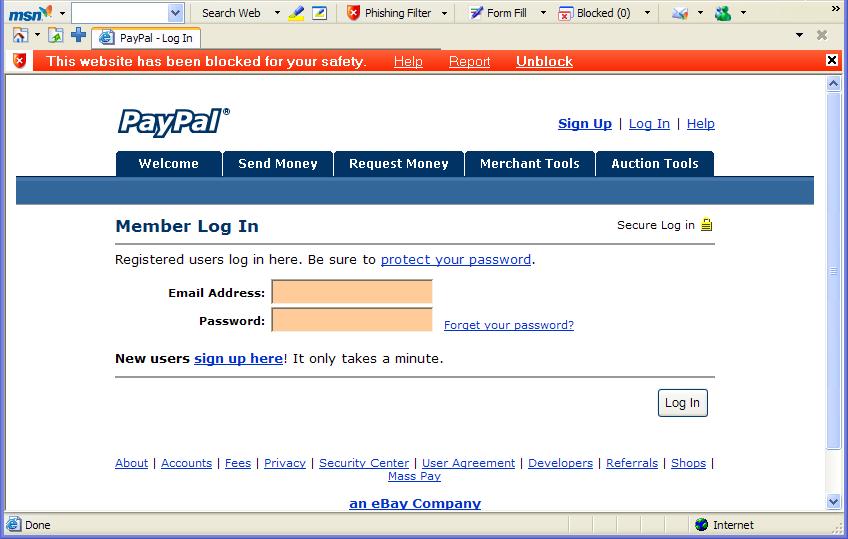
posted by Michael @ 1:16 PM
0 Comments
Have any other Blogger users noticed any problems with the BlogThis! bookmarklet lately? I have and I've finally figured out what the exact problem is. If I use the bookmarklet and I'm am not logged into Blogger is asks me to log-in (as expected)
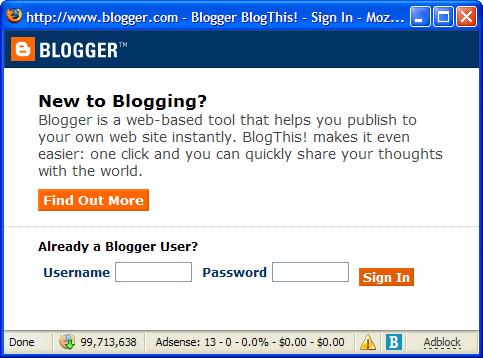 and then I get the usual BlogThis! window with the correct title of the item I'm attempting to blog (sometimes, as theis example didn't give me a title,) but without and post content.
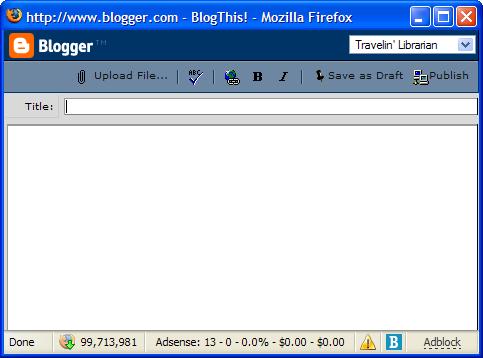 However, when I use BlogThis! and I am logged into the Blogger system, everything works as it should, giving me both the correct title and the correct link in the body of the post.
 Does anyone have any ideas as to a solution? I'm using Firefox and I have reinstalled the bookmarklet several times. Reinstallation has failed to solve the problem.
posted by Michael @ 1:59 PM
0 Comments
A lot happened on the writing front today. I've been asked to contribute a chapter to a forthcoming book (tentatively titled A Day in the Life) about careers in LIS. I'll be writing about a "typical" day in my position. (This ought to be interesting...)
Later in the afternoon I was contacted by someone who's been helping me with The Collector's Guide to Dean Koontz (no, I don't know when it'll be out yet) requesting that I write the forward to his Dean Koontz Encyclopedia. Considering Tim Powers will be writing the introduction, I was honored and accepted the assignment immediately.
Also, WebJunction has agreed to publish two more articles of mine. One on cleaning up Quicktime and another on how to create Firefox search extensions. I'll post links as soon as they're available.
Labels: dean koontz, firefox, wikipedia, wikis
posted by Michael @ 9:10 PM
0 Comments
Firefox users: Here's the security patch you need to solve the IDN buffer overflow issue.
Labels: firefox
posted by Michael @ 10:05 AM
0 Comments
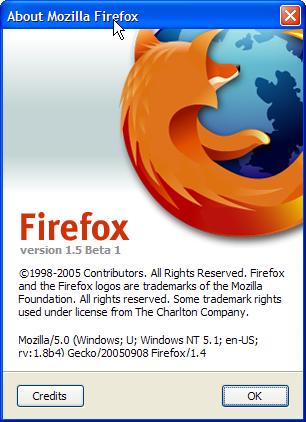 The first beta of Firefox 1.5 has been released. As a warning though, many of your extensions will not work in this version.
What's New in Firefox 1.5 Beta 1
posted by Michael @ 9:23 AM
0 Comments
Have you checked out my list of Firefox Search Plugins recently? I added several more including TVGuide, Bloglines, NPR and the iTunes Music Store.
posted by Michael @ 9:50 PM
0 Comments
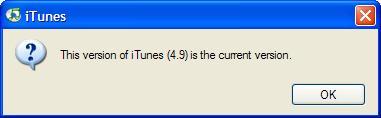
Today Steve Jobs announced that iTunes 5 is available. According to iTunes 4.9, it's not so you can only get it by going to the Apple - iTunes - Download iTunes page.
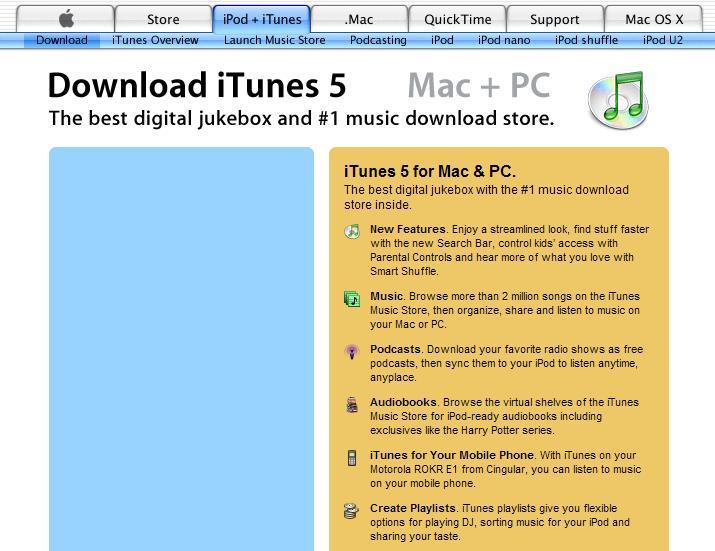
However, I couldn't download it using Firefox.
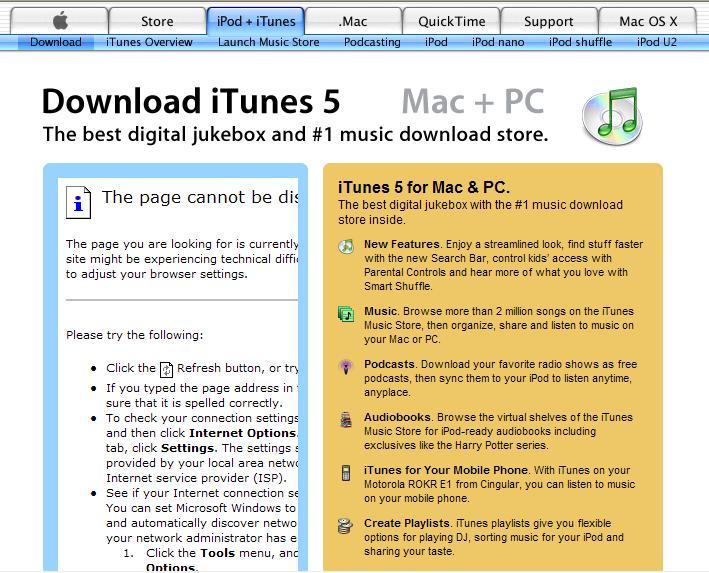
Switching over to IE, it seems the page is busted.
Jobs also announced the new iPod phone.
posted by Michael @ 1:52 PM
0 Comments
I've written two more Firefox search plugins: TVTorrents.com and The Arapahoe (CO) Library District"
Labels: firefox
posted by Michael @ 7:01 PM
0 Comments
 I spent some of the afternoon playing around with XML and Javascript to create some new Firefox search plugins. Unless you're a BCR employee and/or are a user of the Aurora (CO) Public Library, they'll only be of accademic interest to you. However, I'm interested enough to be willing to make a few more if you'd like to make a suggestion.
posted by Michael @ 3:18 PM
0 Comments
Here's instructions on how to turn off Flash-based popups in Firefox. (I've not seen one for several days so it does seem to work.)
Labels: firefox
posted by Michael @ 2:33 PM
0 Comments
C|Net's presents Microsoft Internet Explorer 7 Beta vs. Mozilla Firefox. I do wonder, however, whether it's fair since IE7 is in beta and even Microsoft admits that it's not standards compliant yet.
posted by Michael @ 9:43 PM
0 Comments
Yes, you can add tabbed browsing to IE6 but you have to install the new MSN Search Toolbar to do it. Or, you could just install Firefox.
Labels: firefox
posted by Michael @ 8:08 AM
0 Comments
As I mentioned in my presentation, Firefox is more secure than IE, but nothing is 100% secure. Here's the latest Firefox vulnerability.
posted by Michael @ 2:55 PM
0 Comments
As a Firefox user who sometimes has a dozen tabs open, I wish I could rearrange them to get a certain few next to each other. The miniT allows me to do just that.
Labels: firefox
posted by Michael @ 8:18 AM
0 Comments
I received an e-mail from Asa this afternoon informing me that he'd updated his pop-ups must die! extension for Firefox "that is much less strict on wanted pop-ups". I've installed this one and it seems to solve the problems I mentioned yesterday. Thanks Asa!
Labels: firefox
posted by Michael @ 6:58 PM
0 Comments
I posted about the new Popups Must Die! Firefox extension yesterday and it did sound like a good idea at the time. Earlier today I uninstalled it because it was too strict. For example, Bloglines' BlogThis! bookmarklet no longer worked since it causes a a pop-up. In order to use it, I had to create an exception to every site I wanted to blog about.
posted by Michael @ 7:22 PM
0 Comments
Yes, you can take Firefox with you! Now, when you're at a computer that only has IE, you can just plug in your jumpdrive and run Portable Firefox thanks to John Haller. I've tried it and it works. Just be sure to follow the directions on the site. They're not difficult, just important.
posted by Michael @ 7:05 PM
0 Comments
My latest article, "10 Reasons Why Your Library Should Be Using Firefox" has been published on WebJunction. (No, I had no input on the layout. I'll be tray to get it fixed shortly.)
Labels: firefox
posted by Michael @ 4:13 PM
0 Comments

Sponsor:
Need custom printed
library cards?
Visit RainbowLibraryCards.com
Sponsor:
Are your patrons
satisfied? Consider a
customer satisfaction survey.