Contact
 Blogroll
 Feed
FeedThe Simpsons take on Apple
posted by Michael @ 9:52 AM
0 Comments

"You Two! We're at the end of the universe, eh. Right at the edge of knowledge itself. And you're busy... blogging!"
— The Doctor, Utopia
 Yesterday I tried to use just an iPod Touch to do my work. Surprisingly it went well and I got most of what I needed to do (online anyway) done with a minimal of hassle. That doesn't mean it was a perfect experience. Here's my comments on this experiment based on the notes and reflections from the day.
I turned it on at about 7:30 am and pretty much insisted that I would do any Web surfing and e-mail on the Touch. This overall worked rather well. The e-mail app is way better than the one on my cell phone and Safari is a tolerably good browser. For some specific sites such as MySpace and Facebook I did end up installing site-specific apps which made those sites much easier to use.
For Twitter I originally tried Twitterific but decided it just did work the way I thought it should. I then switched to TwitterFon and that much more fit my Tiwttering style.I found the Delicious App which gave me full access to all my bookmarks but I thought it was supposed to give me a way to also add and edit my bookmarks. If that functionality exists in this program, I'm totally missing it. I also found and installed Wikiamo (a Wikipedia app) and Instapaper (a site I use to mark Web pages for later reading.) Both worked extremely well though Instapaper required a little bit of a setup to get their "Read later" bookmaklet to work but that was a function of how Safari works on this platform and wasn't Instapaper's fault. Wikiamo basically reformats Wikipedia pages for better Touch-based reading. I highly recommend it for anyone who uses Wikipedia regularly.
As for reading my feeds via Bloglines, I've got some issues. I'm not saying it was impossible or even difficult but there were many small annoyances. First off, Bloglines insists on forcing iPod users into an iPod-specific version of the site. Herein lies the problem. There is a "mobile" version of Bloglines which I've been using on my smartphone for a while now and that works great. (Especially since in Bloglines proper you can set certain feeds and folders to NOT display in the mobile version.) However, it seems that on the iPod you can not use the mobile version. Try to go there in Safari and you just get a blank page. But, in the iPod version of the site there's some issues.
First, you can't collapse a folder. So, if you've got a folder with a lot of feeds in it, you must scroll past the every feed to get to what's below. Second, since this isn't technically the mobile version of the site, feeds and folders marked as "don't display in mobile" are displayed. Third, there's no way to mark an item as "keep new" for later reading. Fourth, there's no way to add a new feed.
Granted, none of these issues kept me from reading my content but let's just say it caused some problems with my standard workflow.
As to the keyboard, well, I wouldn't want to write anything more than a paragraph or two at a time. (This post is being written on my desktop computer with a full ergonomic keyboard.) I found that when I stopped worrying about the keyboard itself, I actually ended up typing with more accuracy. In other words, just type and it'll probably come out ok.
One other note about e-mail. I am a smidge bothered by the automatic insertion of "Sent from my iPod" into every e-mail I created. It did get one co-worker to ask me about it later in the day and that was cool but as I thought about it more, Apple is basically inserting an advertisement into my e-mail. That bothers me. (Yes, I can delete it but I shouldn't have to.)
The one significant bother with the whole thing is its inability to sync my task list. Then again, this isn't really Apple's fault. We run an Exchange server here so the iPod perfectly syncs my e-mail, contacts, and calendar; automatically and wirelessly. A definite improvement over the "attach a cable and wait" that is involved with my Windows Mobile smartphone. However, that cable connection syncs my Outlook task list to my phone. Since Exchange doesn't track your local task list, there's no way to sync it along with the other content. I'm not getting an iPhone so it's not like my task list won't be with me anyway. (Yes, I could move to something online like RememberTheMilk but I'm pretty wedded to Outlook for better or for worse.)
This is all not to say that I didn't use my desktop computer at all yesterday. I had some video to edit and render and some photos to upload to Flickr. Neither of those tasks could have been done on the iPod.
At 3pm the iPod told me that the battery was down to just 20%. That's about 7.5 hours of near constant use with full WiFi connectivity just about the whole time. (The WiFi in our building could stand to use a few additional antennas in some areas.) Considering I leave the office at 4pm, I'd say that the battery life on this thing is way more than respectable.
So, in the end, what do I think? I can say I'm still in love. Is it perfect? No. But what relationship is? I've found that if it can get me through a whole day I'm sure it could get me through being on the road. (Though I like to bring a lot of video with me on trips and I'm not going to spend time converting it just to watch it on a small screen.) I'll still be making an official recommendation that those of us who travel should have one of these as if you're not trying to do anything too special, it's nearly a perfect travel too for online access.
Labels: apple, ipod, mobile computing
posted by Michael @ 8:24 AM
1 Comments
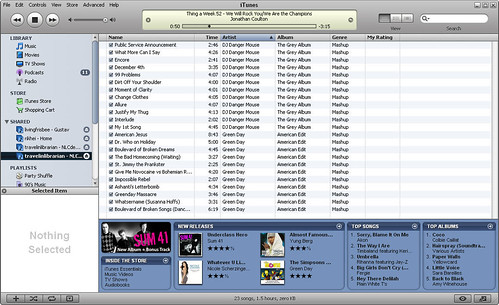
As I posted yesterday, Simplify Media allows you to share your iTunes library over the Internet with up to 30 of your closest friends. Now that I have it running on three out of four of my computers, here's a few follow-up notes.
Just one additional comment: Simplify Media is a good company name but the software itself needs a name of its own. "Simplify Meida" just isn't a great name (maybe it's just me) for this program.)
posted by Michael @ 7:17 AM
6 Comments
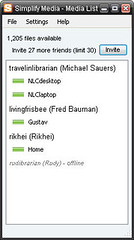 I've got gigs and gigs of music on my home desktop. I've got some podcasts and a few choice albums on my office desktop. If only I could listen to the music on my home PC at work. Or, better yet, on my laptop while on the road. What would be totally amazing is the ability to listen to anything from the libraries of up to 30 of my friends. Wait. What? You mean Simplify Media has software that will let you do all these things? No F'in way! I gotta get me some of that!
My username is "travelinlibrarian" for those wanting to share. I'll add anyone right now but when I hit the limit I'll need to start cutting people so you'd better have some interesting music. Me, I've got more than a full week worth of Bowie for your listening pleasure. Also, you can not copy files between accounts so I think that's how they're "legal". I'm still wondering how long it'll be before someone sues them...
posted by Michael @ 12:50 PM
0 Comments
<fingers in ears>nah nah nah iPhone nah nah nah I can't hear you nah nah nah</fingers in ears>
Labels: apple
posted by Michael @ 8:05 AM
2 Comments
Here'e the first of a seven-part video. The rest can be found on the D|All Things Digital site.
posted by Michael @ 7:13 PM
1 Comments
I wish I were a little apple ipod
Whether podcasting or belting out a tune
If I had to, I could even be a shuffle,
But sorry, I could never be a zune!
posted by Michael @ 9:03 AM
0 Comments
Labels: apple, blogger, cil2007, flickr, ipod, microsoft, rss, second life, treo, video, youtube
posted by Michael @ 10:12 AM
0 Comments
John Van Oudenaren, Senior Advisor, World Digital Library, Library of Congress (jvou@loc.gov)
posted by Michael @ 8:38 AM
0 Comments
posted by Michael @ 3:55 PM
0 Comments
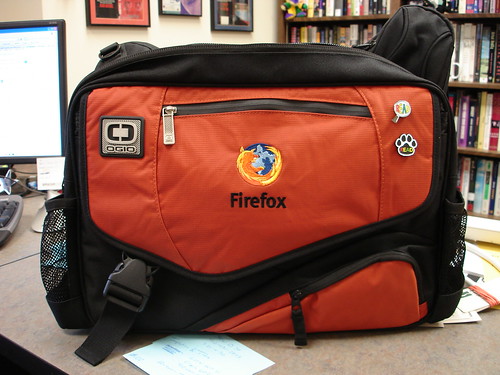
I've been wanting/needing a new laptop bag for a while and it finally arrived today. I've switched from a backpack to a messenger bag. Heck, I never used the left strap on the backpack anyway. This one holds my 17" laptop, folders, pens, notebooks, iPod, camera, and more. And I totally get some geek-cred for the embroidered Firefox logo.
posted by Michael @ 12:52 PM
3 Comments
I've seen the article Speed Up Windows Vista from ExtremeTech blogged about several other places so I wasn't going to mention it here. I did read it though and agree with the criticism regarding the section of the article dealing with Windows services. But the one thing that I got from the article was the importance of making sure your drivers are up to date; especially if you're upgrading from XP to Vista.
First a little background: In my workshop Tech Support on the Fly I talk about Windows update and the different categories of updates you'll find there. One category in XP is "optional hardware updates" and I stress that you should only install hardware (i.e. driver) updates when you're having trouble with said hardware or if the new driver gives you new features you want. This advice spawns from the times that I've had to rollback video drivers on computers where I can no longer see anything on the screen. That is not fun!
So when I upgraded my laptop to Vista I updated as many drivers as I could but was unable to find the updated driver for my video card. (As blogged earlier.) My laptop was running but it seemed a little more sluggish than I would like. I was poking around in the computer's properties last weekend and found something called the "System Rating".
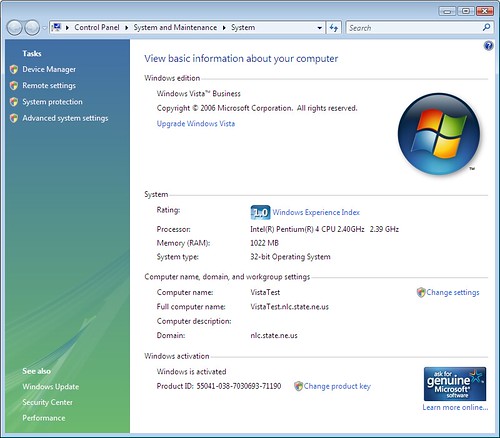
The one pictured here is from my second office computer with known issues so don't worry too much about the low score. In the case of my laptop the score was 2.8 out of five. Looking for a little more detail I clicked on "Windows Experience Index" and found the detail and explanation I was looking for.
It turns out the the rating is based on the lowest score in five categories: Processor, Memory, Graphics, Gaming Graphics, and Primary Hard Disk. In my laptop's case, the graphics rating was 2.8. This may just have been the reason for the sluggish performance of my machine.
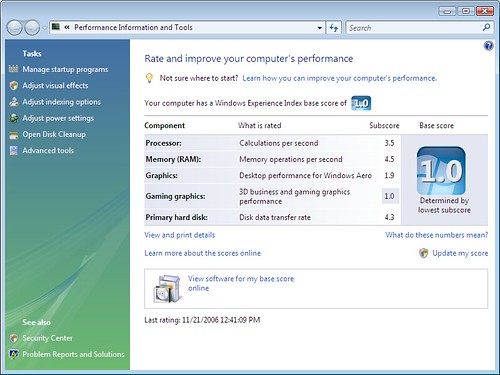
A commenter to this blog had recently pointed out where I could find the driver and a few days ago I download and installed the update. I then went to Windows update and noticed there was an "optional" update to my video driver so I took a chance and installed that next. After all the required reboots I went back to look at my computer's score. The score hadn't changed but it did inform me that it had "found new hardware" and needed to rerun the tests to recompute my score. I clicked OK and waited about five minutes. The score was updated to 3.8 and I was told that I could even comfortably run the Areo interface now.
I switched Aero on and started to play. My laptop is now back to the speed it was running at with XP. (Unfortunately, Second Life still won't run and my iTunes problems still exist but I've ruled out my video driver as the source of the problem.)
So, the bottom line, if you're running Vista, my current advice is to install those driver updates as soon as they become available. Might your system die as a result? Sure, but I'd say the benefits outweigh the very small risks in this situation.
Labels: apple, flickr, itunes, second life, video, vista, windows
posted by Michael @ 9:08 AM
1 Comments
I'm not getting into politics here. I'm not supporting a particular candidate at the moment. However, I have to share this video supporting Obama (though the Obama campaign denies they had anything to do with it,) just due to its creativity for those that remember the classic Apple commercial.
posted by Michael @ 10:32 AM
0 Comments
After several attempts, one of my photos of Twin Lakes, CO was finally deemed worth of acceptance into the Wallpaper Web site InterfaceLIFT. Check it out. There are 13 different resolutions available ranging from 2560x1600 to one small enough for your iPod.
Labels: apple, colorado, ipod, photography
posted by Michael @ 7:51 AM
2 Comments
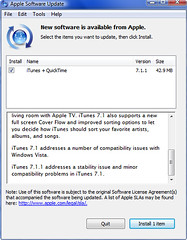
Well, I updated to version 7.1.1 today which said addressed "minor compatibility problems". Despite the fact that I don't view any of the problems I've been having "minor" updates rarely do damage so I had hope. The result: no noticeable change. The display problems have not gone away.
posted by Michael @ 4:51 PM
0 Comments
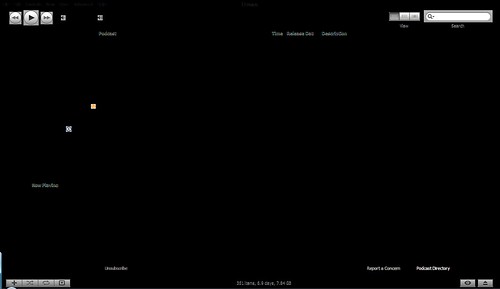
Just when you think the display "problems" can't get any worse, exhibit A:
posted by Michael @ 11:22 AM
0 Comments
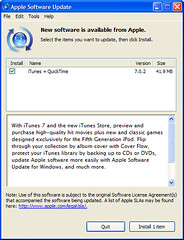
Over the weekend I finally upgraded iTunes to version 7.1, the one that supposedly solves most of the problems in Vista. (Notice the important "supposedly" in that previous sentence. Well, here's my results:
I downloaded the update and ran the installation program. (Side note, why can't iTunes update itself from within the program like most other software today. Why oh why do I have to re-download the program every time there's an update?) The first oddity was the fact that I was required to shutdown Microsoft Outlook in order for the install program to continue. I was also running the Outlook widget in the Vista sidebar and I was required to shut that down too. (Oh wait, I just realized that I had set iTunes to sync my Outlook contacts and calendar so maybe that's why...) Other than that the install worked but seemed to take twice as long as it usually did. (More on speed later.)
Once the install was completed I was given the option to run iTunes automatically. I chose that option and waited a good ten minutes, disk thrashing the whole time, before finally giving up and running iTunes via the desktop icon.
I was asked to accept the license (typical of the first run of iTunes after any update) and was then informed that it was "updating iTunes library..." Twenty minutes later, this was complete. (I don't have the largest iTunes library in the world, just 3712 totaling 16.47GB so this seemed to take much longer than it should have.)
Once I was actually able to use iTunes I started to update my podcasts. Every few minutes I would receive an error that said it couldn't update my library due to not having the correct permissions. I continued to click through the errors and once the podcasts were done downloading I closed and restarted iTunes and this error has not come back since.
As for the display problems, some of them seem to have been solved. For example, the add artwork bug has been fixed. However, all of the other display problems do still occur but after a longer period of time than before. According to Apple, "iTunes may display text or graphics incorrectly on your screen. Resizing the iTunes window should correct this issue." However, I've noticed that once the display problems start, the only solution is to close the program (which does then crash) and restart. Any attempt to resize or minimize locks the program forcing me to go to the Task Manager to kill the process. My theory is that iTunes is incompatible with the Aero interface that I'm running. However, running iTunes in XP Compatibility mode doesn't solve these problems and since compatibility mode turns Aero off, this may not be a logical conclusion.
I eventually noticed that since I chose to make iTunes my default player during the installation process, the default player error has not returned.
Finally, having made sure I followed all of the warnings on the Apple site, I decided to actually connect my iPod to the laptop. The short answer is that it synced as it should. The longer answer is that it seemed to take forever to start the syncing process. Seriously, I plugged it in, Vista made it's horrid "bonk" indicating the presence of a USB device, and my iPod appeared in iTunes within seconds as it should. But, it all just sat there for the better part of ten minutes before any syncing actually started to happen. (I've since synced my iPod a few more times with the same wait each time.) My iPod is in working condition and I lost no data that I've noticed.
So, my conclusions: It's better but serious problems still exist. The known display problems are something that need to be fixed immediately. (I'm assuming that fixing the display problems will solve the crashing issues since it only seems to crash after the display goes wonky.) The other item that must be fixed is performance. I now feel like I'm working under water while in iTunes. Importing works at normal speed but everything else either is or just feels slow, especially the sync function.
posted by Michael @ 7:39 AM
3 Comments
As of yesterday, Apple has released iTunes 7.1 which supposedly addresses a number of compatibility issues with Windows Vista. I'll test it out tonight and report back.
posted by Michael @ 11:05 AM
0 Comments
Some of you have been waiting for this post and I've finally got around to writing. So, how's iTunes working with Vista in my case? No so well. Here's the details based on what I've been experiencing.
First, when I run the program I'm told that it's running in compatibility mode. Trouble is, I've not set that option so I have no idea why I'm being told this.

Next, I'm informed that iTunes is no longer my default audio player and offered an option to go to the screen that will change these settings.

However, once I get there I see no way to make iTunes my default.
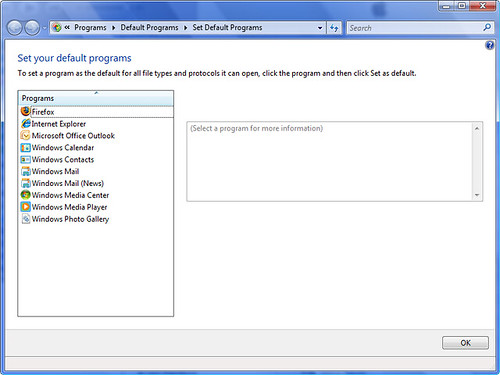
There may be a way to fix this but I'm not seeing it. Why can't I just tell iTunes to set itself as the default like I can with other programs?
Once iTunes is running it usually works for several minutes. Then, the display problems start. They're inconsistent but these are some of the problems I usually see.
Here I've inserted a CD and the window that you can see through is the one that's asking me if I wish to import the CD:
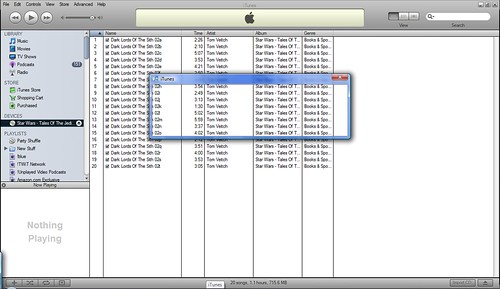
Here the vertical lines separating the tracks have disappeared and the vertical lines have gone bold.
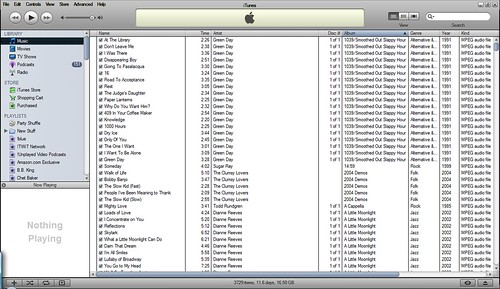
In this example I've selected a single track. Instead of highlighting the track, the track's information disappears.

Here we have all tracks but one selected. Only the unselected track shows information.
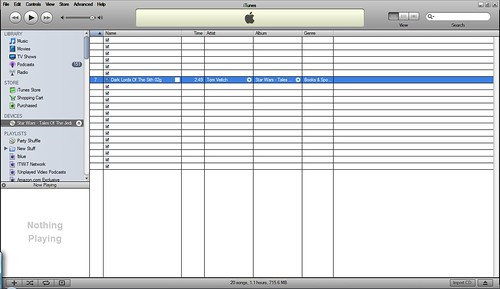
When I try to import album artwork, it doesn't show up in the right place, it appears in the upper-left corner of the window instead.
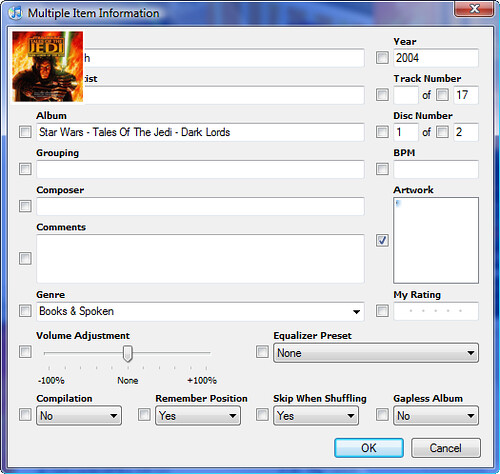
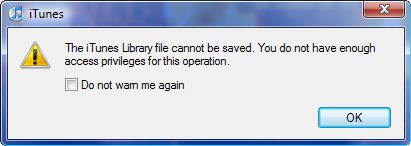
Sometimes when I try to update track information (this is the result off adding the previously illustrated album artwork) I'm told that the data can't be saved. The data does appear to be saved regardless of this message.
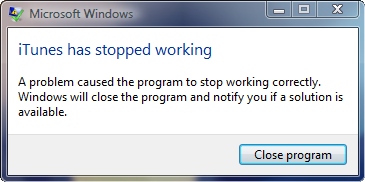
Lastly, on close, the program crashes.
I've not tried to actually sync my iPod yet. I'm using this as an opportunity to get caught up on my podcast backlog. Here's hoping apple releases an upgrade soon.
posted by Michael @ 4:01 PM
0 Comments
Ok, so, what's my official advice on upgrading to Vista? I did it, so should you? Well, let's keep in mind a few important items:
So, with those things in mind, my official advice and this time is the following:
To be honest, I love it despite the problems I'm having. (Second Life won't run, iTunes is fracked, I'm having some issues sharing files between the Vista computer and my XP computer, (let's not even consider the NT4.0 box,) and there's still an outstanding issue with upgrading my BIOS.) The bottom line, is that if everything's running fine on XP and you're considering upgrading everything in the library to Vista "because I can" or "because it looks cool" don't bother. Wait for the next round of computer purchasing and bring it into your system then. You'll be much better off in the long run.
Labels: apple, itunes, microsoft, second life, vista, windows
posted by Michael @ 8:29 PM
2 Comments
 Steve Jobs has written a 2000+ word essay, posted on the Apple, Inc. site regarding his feelings about DRM (digital rights management) on the iPod platform and in general. After a history explaining how we got to where we are today, this is the paragraph that makes the article worth it's weight in gold:
"The third alternative is to abolish DRMs entirely. Imagine a world where every online store sells DRM-free music encoded in open licensable formats. In such a world, any player can play music purchased from any store, and any store can sell music which is playable on all players. This is clearly the best alternative for consumers, and Apple would embrace it in a heartbeat. If the big four music companies would license Apple their music without the requirement that it be protected with a DRM, we would switch to selling only DRM-free music on our iTunes store. Every iPod ever made will play this DRM-free music."
His thoughts only get more interesting from this point as he clearly states why it makes total sense for the mucis corporations to ditch DRM. Read it and give copies to all your friends.
posted by Michael @ 9:34 AM
0 Comments
 According to Apple, Inc. the current version of iTunes is bascially incompatible with Windows Vista. The document describing the problems offers several "solutions" for those that insist on upgrading to Vista before an updated "Vista compatible" version of iTunes is released. Worst case scenario: "Ejecting an iPod from the Windows System Tray using the "Safely Remove Hardware" feature may corrupt your iPod. To always safely eject an iPod, choose Eject iPod from the Controls menu within iTunes." Apple is also offering an iTunes Repair Tool for Vista 1.0 that will also supposedly solve some problems.
IMHO this is totally unacceptable. Vista has been gold since something like early December yet Apple has yet to solve the problem. I'm glad I ran across this before upgrading as I run my iPod off the same laptop I'll be upgrading. Hopefully, Apple will release the updated version in the next two weeks before I get the time to install Vista.
posted by Michael @ 1:23 PM
1 Comments
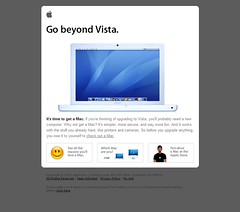
It looks like Apple is jumping on the Vista bandwagon, just not in the way Microsoft would hope for.
posted by Michael @ 9:11 AM
0 Comments
I remembered earlier today that I previously posted a list of the "professional" podcasts I listened to and promised a list of "personal" podcasts. Well here it is.
Labels: apple, doctor who, itunes, starbucks, video
posted by Michael @ 3:46 PM
0 Comments
Enter your iPod's serial number into The iPod Death Clock, provide a little information about how much you use it, and get an estimate on how much longer it'll live. I was told that the new one I got for Christmas will last another 575 days. Based on previous experience, that does sound about right.
posted by Michael @ 10:16 AM
1 Comments
AOL posts some commercials for their new search service and an Apple customer posts a commercial for the iPhone which doesn't even exist. Read the comments: compare and contrast.
posted by Michael @ 9:27 AM
0 Comments
The first two teaser trailers for Ghost Rider can now be found on the Apple site. Here's a few screengrabs for your enjoyment.


posted by Michael @ 4:53 PM
0 Comments
posted by Michael @ 8:17 PM
0 Comments
Steve Lawson, Colorado College & Emilee Satterwhite, Mesa County Public Library
Labels: apple, blogger, colorado, itunes, rss, video, wikipedia, wikis
posted by Michael @ 3:40 PM
0 Comments
 Greg Schwartz, Louisville Free Public Library
posted by Michael @ 2:13 PM
0 Comments
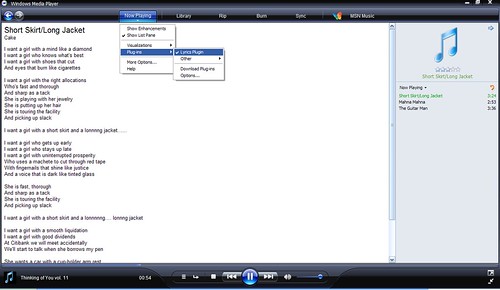
If you use Windows Media Player or WinAmp to play your tunes, install the Lyrics Plugin and the lyrics of the song being played will be automatically displayed for you. Now, if they'd only make an iTunes version.
posted by Michael @ 12:14 PM
2 Comments
There's nothing like coming into work after a few days off to recharge (more about that later) and finding these two gems to make me love this profession.
The first is about John Blyberg and the Cherry Hill Public Library in new Jersey ripping every CD in the collection and making more then 49,000 songs available for patrons to listen to in the library. Yes, even those with laptops over the WiFi network! (John's Technical post and Michael Stephens' post with photos.)
The other item courtsey of Michael Stephens is the video from SJCPL's 2003 staff day. (Be sure to stay through the credits.)
posted by Michael @ 9:55 AM
0 Comments
iTunes 7 is now available for download from the Apple site. The "check for updates" feature in iTunes 6 keeps reporting that the update server is unresponsive so if you want it, a direct download may be our only option for the near future.
posted by Michael @ 2:17 PM
0 Comments
Engadget covered the "It's Showtime" keynote that finished within the past 1/2 hour. If you're wondering what's up with the iPod, iTunes, and the iTunes Store, this is the post you need to read. (My favorite part, iTunes 7 will give you album art for your music as long as you have an account. This includes music you imported yourself!)
posted by Michael @ 12:52 PM
0 Comments
I once surfed for RSS icons and found more than 20 different ones regularaly used. Noticing that iTunes started using a new icon to represent podcasts I decided to take a look for those this time around. Here's seven. There were others but they were mostly variations on the ones reprinted here. So, what do you think? Which do you feel should be the standard?




posted by Michael @ 11:37 AM
5 Comments
I've moved my iTunes folder off the network to my now-larger hard drive (more about that later) so I had to resubscribe to some of my podcasts. Unfortunately, the iTunes store seems to be down. My guess is that they're prepping the system for the soon-to-be-released movie downloads.

posted by Michael @ 11:20 AM
0 Comments
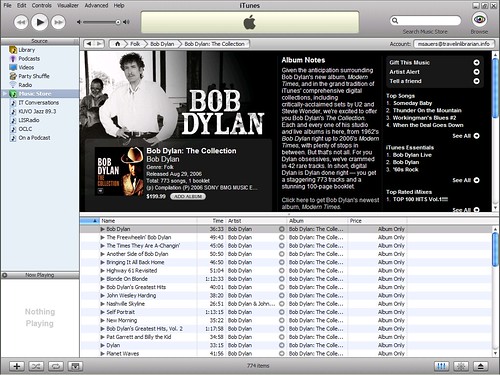
You may have heard that you can get the new Bob Dylan album via iTunes. But did you know you can get Bob Dylan: The Collection from iTunes. Every (52) live and studio album, 773 tracks including 42 "rare" tracks, and a 100-page booklet for $199.99. If you have iTunes installed here's a link to the store.
posted by Michael @ 12:27 AM
1 Comments
So, you've found yourself at a concert sans lighter and cell phone but you do happen to have your video iPod with you. You can still salute during your favorite power ballad with iScorch. (I wish I was making this up!)
posted by Michael @ 1:46 PM
0 Comments
If you find the title of this post funny, and know what "TMNT" stands for, then you're probably looking forward to the next film. In the mean time, here's the first teaser trailer for you.

Labels: apple
posted by Michael @ 10:00 AM
1 Comments
Unless you've been living under a rock (or just don't care,) series two of Doctor Who started this past Saturday in the UK. (Yes, you can find it on BitTorrent.) The news of additional coolness is that Mr. Davies is producing a podcast of episode commentaries. You can find it via iTunes (just search on "Doctor Who") of, for those of you that are iTunes-less, the URL for the feed is http://www.bbc.co.uk/doctorwho/rss/2006_commentaries.xml.
Labels: apple, bittorrent, doctor who, itunes, rss
posted by Michael @ 5:55 PM
0 Comments
Labels: apple, drm, ipod, itunes, marketing, sony, tabletpc, treo, video
posted by Michael @ 10:13 AM
2 Comments
posted by Michael @ 8:50 AM
0 Comments
I love alternate history novels, espcially those by the master of the sub-genre Harry Turtledove. Well, here's a video showing us what would have happened had Microsoft developed and marketed the iPod.
posted by Michael @ 11:15 AM
0 Comments
I'm spending the night in Everett, WA on my way to teach in Marysville tomorrow. After dinner I spotted a starbucks down the street and decided to get a caramel machiato to help me relax. (Decaf.) Outside was a sign for Starbucks' new Hear Music Media Bar. I'd heard about this before and now I was definitely making a stop.
After getting my drink I sat down at the system and started to browse. It turns out that these systems have thousands of CDs completely available for selection and on site burning. Additionally you can select the tracks of your choice (nothing was "album only" as some iTunes tracks are) to burn onto a custom CD.
I selected seven songs for the base price of $8.98+tax. Each additional song is $0.99 but I held my ground. I was ablt to reorder my list since I hadn't selected my songs in the order I wanted them on the CD. I was also able to pick a graphic from a selection of about 40 images. (I didn't count so that number is just an estimation.) I was also asked to choose a title for my CD.
I finalized my list and swipped my credit card. It did not ask me for a signature and promptly processed the charge. While the CD was burning a printout was made which I folded along the perforations as instructed and inserted into the flaps of a paperboard and plastic jewelcase. About three minutes later my CD, lebeled with my title popped out, ready to be placed in the newly customized jewelcase.
Overall the system worked as advertised however it isn't perfect. First, the on-screen keyboard has keys in alphabetical order. As someone used to a QWERTY keyboard, this made my searching and title entry a bit dificult. Secondly, the price. The track peices are in line with iTunes but since you're getting a physical item, the starting price seems a bit high for seven songs but I guess it's justifiable.
I documented the process with my camera. The 12 photos can be found in a set in my Flickr account.
posted by Michael @ 10:35 PM
0 Comments
Patricia Uttaro the director of the Ogden Farmers' Library in Spencerport, NY (half-way between my folks in Greece and my brother in Brockport, and home to an aunt,) has a blog. Now, if the director of a library that serves a population of approximately 3500 thinks it's worth her time to blog, what's your director's excuse?
Oh, and did I mention they're getting iPods to circulate? Check out what they're pre-loading them with:
"In addition, we will offer iPod devices for borrowing. Some iPods will be pre-loaded with a recorded tour of the Village and Town so visitors can find their way to places like Coffee Cabana, Grandpa Sam's, the Unique Shop, Union Street Primitives, and Afrikamba Curios. Also loaded on the devices will be a pre-recorded historic tour of the Village that can be used by local people and school children studying the Erie Canal. Other iPods can be borrowed long-term by people traveling along the canal."
Next time I'm back home, I'm going to make a point to stop by and meet Ms. Uttaro and thank her for being so progressive.
Labels: apple, comicbooks, ipod
posted by Michael @ 4:31 PM
1 Comments
posted by Michael @ 3:40 PM
0 Comments
posted by Michael @ 3:57 PM
0 Comments
Check out this mashup featuring Queen and 50 Cent before a record company orders this one taken offline too. (I've not listened to it yet, but it's on the iPod for tomorrow.)
posted by Michael @ 8:12 PM
0 Comments
Just in case you don't have enough on your iPod to listen to, your subscribed podcasts are just boring, or you want to actualy learn something, Stanford has made lectures and other material available through iTunes.
posted by Michael @ 10:10 PM
0 Comments
I've got a 40GB iPod with hundreds of albums of music on it. There was no way I was ever going to get all that album cover art into iTunes also. Well, the iTunes Art Importer 0.9.2 actually does a very good job of it with minimal input. (It did come up with a completely off-the-wall for Queen's Jazz album but otherwise the results were impressive.)
posted by Michael @ 11:40 AM
0 Comments
Jenny Levine, The Shifted Librarian Jessamyn West, Librarian.net Flickr, Tagging, and the F-Word (Jessamyn)
del.icio.us (Jenny)
Labels: apple, del.icio.us, itunes, metadata, rss
posted by Michael @ 3:50 PM
0 Comments
Ken Weil & Joe Latini, South Huntington Beach Public Library
posted by Michael @ 12:49 PM
0 Comments
The trailer for V for Vendetta is up on the Apple trailer site. I've linked to the HD version so the smallest one is 42MB but worth every minute of the download time.
Labels: apple
posted by Michael @ 9:50 PM
0 Comments
Uh, didn't iTunes 5 just coem out something like a month ago? Well, it looks like version 6 is now available.
posted by Michael @ 2:15 PM
0 Comments
Michael Stevens' blog pointed me to this report from the Mid-Illinois Talking Book Center in which the author, Thomas A. Peters, states:
"The fact that netLibrary's digital audio books are in the protected WMA file format, coupled with the fact that Apple iPods and most accessible devices (for example, the Book Port and the Book Courier) will not play the WMA file format, is unfortunate. One can only hope that soon both Apple and the manufacturers of accessible playback devices realize that supporting the playback of WMA content is in everyoneÂs best interest. "
Come on. This is never going to happen. You might as well try to convince Windows Media Player to play Apple's DRM-encrusted, proprietary AAC format. Here's a suggestion that might actually get some results. Get the vendors, netLibrary in this case, to offer downloads in both WMA and AAC. Give the users choice. Then everyone's happy.
posted by Michael @ 9:36 AM
0 Comments
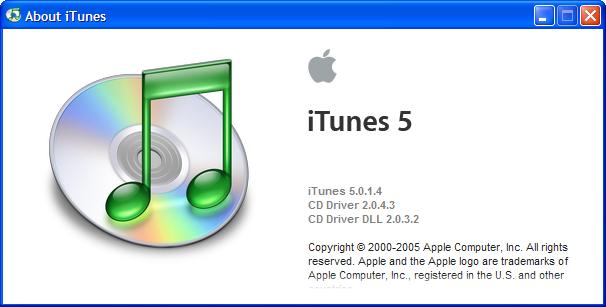 Apple has released their first iTunes update since 5.0 was released exactly two weeks ago. I'm sure version 5.0.1.4 fixes "stuff" but I couldn't find any specific details on Apple's site. Best way to get it, select Help|Check for iTunes Updates in your copy of iTunes.
posted by Michael @ 4:45 PM
0 Comments
Have you checked out my list of Firefox Search Plugins recently? I added several more including TVGuide, Bloglines, NPR and the iTunes Music Store.
posted by Michael @ 9:50 PM
0 Comments
FedEx just pulled up and dropped off my brand new replacement iPod; custom engraving included. Final judgement: 9 out of 10. (They lost a point for charging me the $32 to ship it.)
posted by Michael @ 1:16 PM
0 Comments
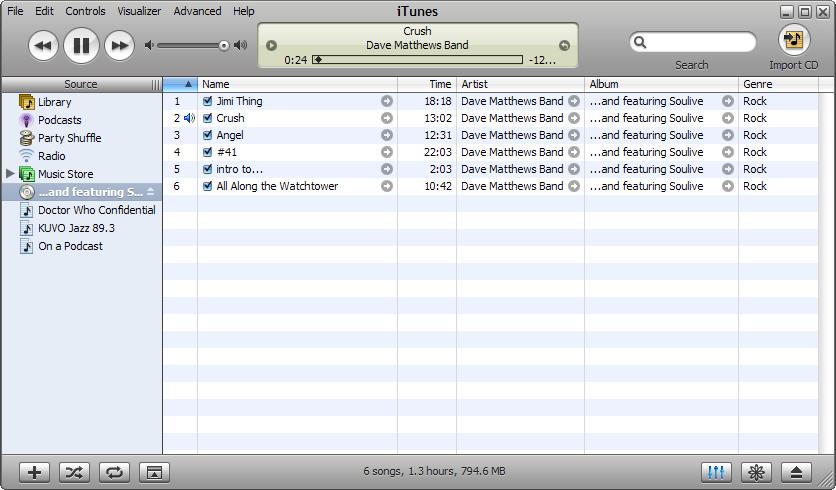
I'm sorry, but I just don't like the look of iTunes 5... (If I figure out exactly what I don't like I'll be sure to let you know.)
posted by Michael @ 3:06 PM
0 Comments
It seems that just minutes later the Apple - iTunes - Download iTunes page is now working.
posted by Michael @ 2:00 PM
0 Comments
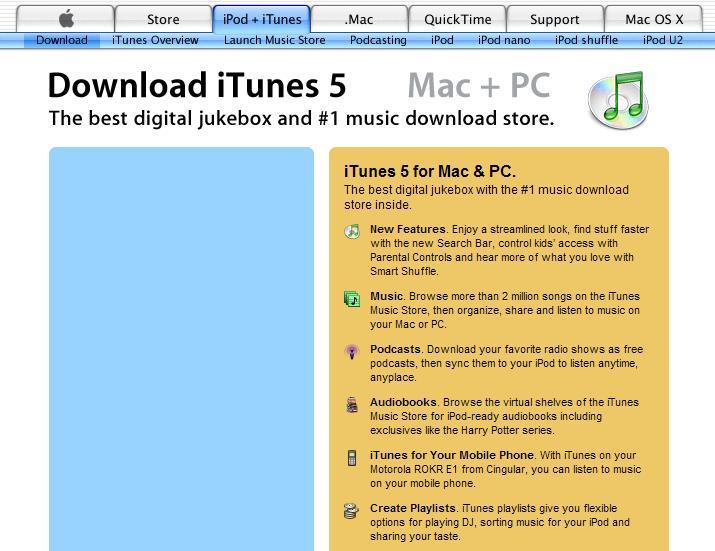
Today Steve Jobs announced that iTunes 5 is available. According to iTunes 4.9, it's not so you can only get it by going to the Apple - iTunes - Download iTunes page.
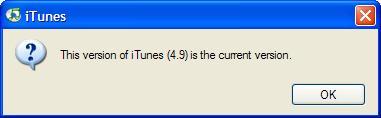
However, I couldn't download it using Firefox.
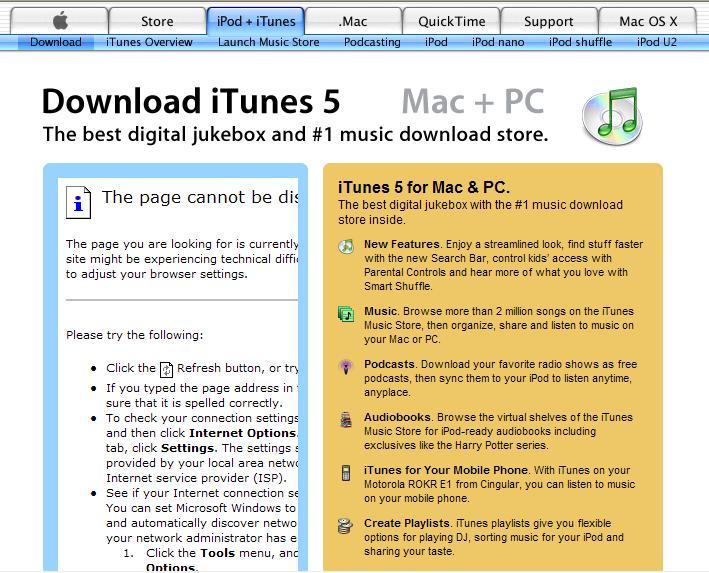
Switching over to IE, it seems the page is busted.
Jobs also announced the new iPod phone.
posted by Michael @ 1:52 PM
0 Comments
An e-mail from Apple this morning informs me that my "service request has been completed and your product is on its way. Please allow two business days for delivery."
posted by Michael @ 8:07 AM
0 Comments
I woke up this morning to an e-mail from Apple stating that my iPod had been received and that I'll be notified when repairs are complete.
posted by Michael @ 9:47 AM
0 Comments
The box arrived. I opened it, packed up my iPod as instructed and even resealed the box with the enclosed packing tape. DHL will be picking it up by 5pm
posted by Michael @ 11:28 AM
1 Comments
 I wish I were a little apple ipod,
courtsey of L
posted by Michael @ 7:04 AM
0 Comments
 Today my iPod decided to hose itself. Luckily it's still within the "one-year limited warranty" period (I ordered it on 12/28/04) so I can get it fixed/replaced for "free". (Since it's more than 6 months old, I do have to pay the $32.27 shipping fee.) Apple is sending me a box to pack it up in and send it back. I've heard good stories about Apple's service and I've heard horror stories about Apple's service. Which one will this be? Stay tuned and find out.
posted by Michael @ 8:24 PM
0 Comments
I turn on my comments and look what happens. I get Walt Crawford pointing me to his response to my post regarding Alan Wexelblat's opinion. I guess that leaves me to attempt to explain my position in a coherent way. Here goes:
My biggest problem with the DRM-based expiration of eAudioBooks, or other digital items for that matter, is who gets to decide when they expire. Walt makes the point that the "library's paid for the right to have one copy of the audio ebook in use at any one time. How is that different than lending a book?" It's different because of who has the control. In the case of a physical book, the library invokes the right of first sale, giving them the right to loan it out as they see fit. Yes, the library loans it for a limited period but that's the library's choice. Some libraries allow for two weeks, some allow renewals (usually a finite number of times,) while other libraries allow patrons to check out items indefinitely, only to be recalled when requested by another patron (i.e. for a professor or Ph.D. student at a university.)
The problem with these eAudioBooks is that the publisher is imposing their will on the library and, in the end, on the patron. The library has been taken out of the process. Sure, we could decide to challenge this practice by not spending our money on the product, but where does that leave the library and the patron; without the material they're looking for. Not exactly great customer service.
Ultimately, we're stuck. The books are restricted by DRM, and don't work on all devices. (I'm an iPod owner and I'm SOL.) We buy them because they're the only option and when presented with a take-it-or-leave-it decision, people are going to be more than happy to point out the flaws.
posted by Michael @ 6:23 PM
1 Comments
According to this MSNBC.com article:
"...last fall... the district issued some 600 Apple iBook laptops to every student at the high school about 50 miles northwest of Philadelphia. The computers were loaded with a filtering program that limited Internet access. They also had software that let administrators see what students were viewing on their screens."
What could possibly go wrong?
"Some students also turned off the remote monitoring function and turned the tables on their elders — using it to view administrators' own computer screens."
Oh, and they viewed some porn and installed iChat too. The copys have been called. The sutdent's side can be read at cutusabreak.org.
Labels: apple, pornography
posted by Michael @ 8:26 AM
0 Comments
Have you heard the latest hit from the band Cruisebox? It's the hottest thing on your iPod since your first downloaded podcast. On a Podcast
posted by Michael @ 2:17 PM
0 Comments
Dynamist Blog has s photo of a display for iBooks in an Apple Store which implies "books" are on the way out.
Labels: apple
posted by Michael @ 8:26 PM
0 Comments
I'm in Manhattan, KS through today, sans laptop. (Insert screams of e-mail withdrawl here.) Photos to be posted later as I have no way to get them off my camera.
Labels: apple
posted by Michael @ 8:37 AM
0 Comments
Why? Because the new version of iTunes (4.9), released today, natively supports podcasting.
posted by Michael @ 11:43 AM
0 Comments
If you haven't yet listened to Greg Schwartz's Open Stacks podcast yet,
posted by Michael @ 5:56 PM
1 Comments
This list of 50 Fun Things To Do With Your iPod actually contains a few that do sound not only fun but useful.
posted by Michael @ 5:27 PM
0 Comments
Here's instructions on how to get your text RSS feeds on your iPod. (I'll stick to Bloglines thanks, since it doesn't tie me to a particular device. This is still cool though.)
posted by Michael @ 4:57 PM
0 Comments
Michael Stephens has written an article on iPod experiments in libraries. Go Michael!
posted by Michael @ 5:54 PM
0 Comments
Are you a Mac user wanting to upgrade to Tiger? Better have a DVD-ROM drive else it's going to cost you $9.95. (Scroll down to "Media Exchange Program" on right.)
Labels: apple
posted by Michael @ 5:30 PM
0 Comments
I've decided to post my final CIL entry here instead of on my CIL05 blog since it's way long and I though it would be of interest to those who read this blog and have not been reading the other one.
7:39am Chicago O’Hare International Airport
When last we left the Travelin’ Librarian… Wait, I have absolutely no idea when I last blogged. (I’m not online as I write this post; I plan on posting it when I finally get home.) I think it was sometime around Friday morning, and I was in DC at CIL. Then again I could be wrong. Here’s what’s happened since then...
I did my Bookmarklets Cybertour and it went well. Several people hung around after the presentation to ask some very good questions. (There are photos, taken by Amanda, in my CIL ofoto album. Karen, Amanda and I decided to head off to find some lunch on 18th street and Karen suggested that we "bag the rest of the afternoon" and go to the zoo. I was done with anything required of me at the conference and had never been to the national zoo so I thought this would be a wonderful idea. We found some Mexican for lunch and spent the rest of the afternoon at the zoo. (Zoo photos also in the previously linked album.) Finding ourselves at the far end of the zoo and exhausted the three of us walked back through the zoo and caught a cab back to meet up with the bloggers dine-around at Thaiphoon at 6pm.)
As dinner was starting I received a text message from Katrina who I’d met on Wednesday evening at the speaker’s reception and sat with at the Dead Technologies presentation. Having no specific plans for the evening we decided to meet up at 8:30 for some coffee.
We met up at the appointed time and went out for some coffee. Two hours later we decided to vacate the coffeehouse on Connecticut and head for a different one (Tryst) on 18th. Finding Tryst mobbed and the music (although good) very loud and not conducive to conversation we decided not to stay. (How the students there were getting their work done I’ll never understand.) Heading back down the block, Katrina spotted a hookah bar and said she’d hadn’t done that since her last trip to Israel. Always wanting to try new things, it sounded like a wonderful idea to me. (See photo on moblog.) At 2am we decided to head back to our respective hotels.
Back at the hotel, I opened up my laptop to discover that some significant screws had come loose and that the lid/screen would no longer close without splitting open. Did I have a screwdriver small enough for these screws? Of course not. Eventually I broke off the metal pocket clip from a vendor’s swag pen (they’re good for something) and used it to retighten the screw. Meanwhile Katrina and I had made plans via SMS to meet up for breakfast before out flights home. I set my alarm for 7am and went to bed. It was 4am.
I woke up promptly at 6:15, showered, turned off the alarm and headed out to wonder about the neighborhood to kill some time. At 8, Katrina and I met up again, went back to the coffee house of the previous evening and had some breakfast then walked around DuPont circle. Eventually, we ended up back at my hotel where SuperShuttle picked me up at 10:15 to get me to Regan National for my 12:45 flight to Chicago, to be followed by a 2:55 flight home to Denver. Katrina was scheduled on the 2:45 flight back home to Chicago. (Ah, the best laid plans...)
I got to National, checked my one bag with my clothes, cords, etc., and got through security without a hitch. I’d been placed on standby for the 12:24 flight since it had been oversold. Sensing an opportunity for some company at the airport, and since she wasn’t feeling well and not looking forward to her flight, I asked the gate agent if I could be moved to the 2:45 flight to Chicago, then booked on to Denver. At first she said no since my bag was already checked on the 12:45 flight and that I needed to go with my bag. (It’s a security thing.)
At 12:15 they started boarding the flight and calling names from the standby list. When I didn’t hear my name in the first group called I re-approached the gate agent and offered to move to standby on the 2:45 flight. This time it was no problem. I was put on standby for the later flight, and again put on standby for a later flight from Chicago to Denver. Katrina arrived at the airport; we got some ice cream and settled in to wait for our flight. I got on the 2:45 flight; we exchanged a seat with another passenger (luck him as Katrina’s seat was up front with the premier executives), and continued our conversation on the way to Chicago.
We got to Chicago on-time and proceeded to the gate for my Denver flight. We got to the gate and we informed that the flight to Denver was oversold by 30 seats and there were an additional 15+ standby passengers. Getting on this flight did not look good. At this point the gate agent said that I wasn’t on the flight that I’d just gotten off of. What!? According to the system, I’d flown to Chicago on my original 12:45 flight. This made absolutely no sense. 10 minutes later I got a complete story, sort of. It seems that I’d been assigned a seat on the 12:45 flight, i.e. no longer on standby, and that I’d "volunteered to give up my seat" on that flight. (This was news to me.) Since this was my "choice" I was now on perpetual standby for the rest of the day. Katrina said I could stay at her place for the night so could I be guaranteed on a flight on Sunday morning? The answer was no, because this was all my fault. I’d have to wait until I’d not gotten on the last flight out Saturday night as a standby passenger before being moved to standby mode on Sunday morning.
We left the gate and headed for customer service. Luckily, Katrina flies United enough to be a premier executive and was able to get me into the Red Carpet Club where the line for help is nonexistent. (This was my first time in one of these clubs. Unfortunately I now know what I’m missing.) The customer service agent confirmed the story to me. So, we started to discuss options. Could I purchase a new ticket home in on Sunday morning? There was one available for $320. (Ouch!) Could Katrina use some of her frequent flyer miles to get me a ticket home on Sunday. Yes. A business class seat for 40,000 miles. (Thanks for the offer but I felt very uncomfortable accepting such an offer.) Could I change my Denver to Des Moines flight on Monday morning to a Chicago to Des Moines flight? (Had everything worked out as originally planned I was to be home for 41 hours before leaving on another trip.) I figured that I could cover the $100 change fee and hopefully get my bag with appropriate clothing (which was by this time on its way to Denver) to meet me in Des Moines. Well, take the original ticket price, subtract the $100 change fee, and then add the difference for the new flight and the total was more than $450. (Double ouch!) My best option was to accept Katrina’s offer of the miles, despite all of the associated guilt.
We asked the customer service rep to do this for me when, like Mighty Mouse swooping in the save the day, a seat opened up on the Sunday 8am flight to Denver which they could switch me to at no charge! (I had used a previously-earned free flight coupon to go book this trip, and the available seat fell into the category allowing this change without charging me anything.) Problem solved.
Sort of.
I had a flight out in the morning and I had a place to stay. All my clothes were in Denver at this point. Washing machine in Katrina’s apartment, here we come. On top of that, my cell phone charging cable had been packed in the Denver-based bag. Send off a few quick txt messages to let people know I’m o.k. but not home yet (this is your explanation folks, a little long for a 160-character txt message) and turned off the phone for the night to conserve the 40% of the battery that was left. Get Katrina’s bag, head for the El, and into Chicago we head. It’s now 6pm on Saturday.
Drop off the bags, dinner at a great Indian/Tappas restaurant (can’t recall the name), and back to the apartment for laundry (don’t ask what I ended up wearing in the meantime…), True Romance (the movie), and more conversation. Set the alarm for 6am so I can take the El back to O’Hare (I’m already checked in and my luggage is in Denver so all I’ve got to deal with is getting through security), and get some sleep. It’s now 3am.
Wake up Sunday morning (in case you’re not keeping track I’ve had a total of 6.25 hours of sleep since I woke up Friday morning), say goodbye and a very big thank you, take the El back to O’Hare, get through the short line at security (I didn’t even have to take off my sneakers), and to the gate I head, stopping off at a Starbucks for some much needed caffeine. At the gate they’re in an oversold situation again. (Why is everyone suddenly trying to get to Denver?!) This time they’re asking for volunteers to give up their seats in exchange for a free flight voucher. The temptation was just too great.
It’s now 8:21 am on Sunday and I’m sitting at gate C24. I’m on standby for the 9am flight to Denver but it’s unlikely that I’ll get on the flight. I do have a confirmed seat on the 11:55 flight which will get me into Denver at 1:45pm, approximately 18 hours before I need to be back at DIA to catch my flight to Des Moines. But, I’ve also got a free flight voucher in my bag.
I wonder where that little blue slip will take me
9:13am
Since I’m writing this, you can correctly assume that I didn’t get on the 9am flight. I didn’t expect to, but it was actually close. It turned out that two people didn’t show up for the flight and there was a group of five ahead of me on the standby list. (Lucky me!) Unfortunately, they asked the leader of the group of five if they were willing to split their party (send two on this flight, and the other three on a later flight), and they too the offer. That left me shuffling off to gate C19 to wait for my 11:55 flight.
At least now I’ve found a working outlet so I can actually get some editing done of the XHTML/CSS book. The presence of working outlets, (or outlets at all for that matter,) seems to be sparse in O’Hare (with the exception of in the Red Carpet Clubs). I’m currently sharing an outlet panel with a recharging people car. Then again I might try to get some sleep. Maybe I should pack an emergency DVD from now on.
11:29
I'm on the plane but alomst passed on another flight. At the last minute they announced that they were looking for voulnteers again. This time for a free trip voucher and a business class seat to Denver. I considered it until I learned they'd provide the upgraded seat on the 5:15pm flight. I decided that another 5 hours in O'Hare just wasn't going to allow me to keep what little sanity I have left.
3:01
I'm home after stopping by the office to pick up some materials I need for the Des Moines trip tomorrow. I actually slept for the whole flight to Denver, an unheard of occurrence for me. I guess I needed the sleep. (Current total now 8.25 hours in the past 57 hours.) I've also returned some overdue library materials and found out that the dry cleaner's isn't open on Sunday. All my devices are plugged in to recharge (laptop, cell, iPod) and the first load of laundry is in the wash. My held mail didn't get delivered yesterday so I don't have to deal with that, however much I'd like to. Maybe I'll try to take a short nap.
posted by Michael @ 4:01 PM
0 Comments
I'm not sure why I want the iTube but I do. Maybe just because it looks cool. I'm afraid to look for a price on this gadget though.
posted by Michael @ 6:48 AM
0 Comments
I'm not sure why I want the iTube but I do. Maybe just because it looks cool. I'm afraid to look for a price on this gadget though.
posted by Michael @ 6:48 AM
0 Comments
It's a bit on the pricey side for a mini but if you know of someone looking for a sky-blue iPod (and I do) check out the Doraemon Limited Edition iPod mini Set.
posted by Michael @ 7:26 PM
0 Comments
I wish I were a little Apple ipod
I'd live in MIchael's pocket or his car.
And he'd never, ever leave the house without me,
even when he wasn't traveling far.
I know that Michael loves his Apple ipod,
even though it's white instead of blue.
I must admit that if I were his ipod,
I'd rather be a more enticing hue!
posted by Michael @ 2:57 PM
0 Comments
I wish I were a little Apple iPod.
I wanna wear a stripey cable sock!
But if I were a little Apple iPod,
all I'd play is jazz and blues and rock!
posted by Michael @ 5:35 PM
0 Comments
Oh, I wish I were a little Apple iPod.
That is what I'd truly like to be.
'Cause if I were a little Apple iPod,
everyone would dress themselves like me.
— L & G
posted by Michael @ 7:30 PM
0 Comments
My brand-spankin' new 40BG iPod araved an hour ago. It's formatted, holding 8.8 days worth of music (and it's only 1/3rd full) and currently charging.
posted by Michael @ 10:08 AM
0 Comments
O.k. now I've got a work-related reason why I need an iPod. Westciv has a complete CSS reference that you can
install on your iPod.
Courtsey of WebStandards.org
posted by Michael @ 8:29 AM
0 Comments

If everyone I know who's planning on getting me a Christmas present went in on a single gift, I'd really love a 40Gb iPod.
posted by Michael @ 2:08 PM
0 Comments

Sponsor:
Need custom printed
library cards?
Visit RainbowLibraryCards.com
Sponsor:
Are your patrons
satisfied? Consider a
customer satisfaction survey.