 Contact
 Blogroll
 Feed
FeedGoogle on Uncrawled URLs in search results
posted by Michael @ 7:45 AM
0 Comments

"You Two! We're at the end of the universe, eh. Right at the edge of knowledge itself. And you're busy... blogging!"
— The Doctor, Utopia
 Officially, Google Docs files are compatible with Microsoft Word. Yeah, there are some limitations but if you want online access to a document or want to collaborate on a document with others, Google Docs is a great tool.
Because of this compatibility you’ve always been able to edit a Google Doc in Office. The problem was, you had to log in to Google Docs, download the file, open it in Word (or Excel), edit it, save it, and upload it back to Google Docs. That’s hardly an efficient use of your time.
But what if you could access your Google Docs transparently via Office? Now you can when you download and install OffiSync! Once installed in either Office 2007 or 2010 (I’ve not tested it in Office 2003 yet) you’ll get an additional ribbon which allows you to directly access your Google Docs files.

Ok, technically it does the downloading and uploading for you, so you’re technically not live editing as you can with others when logged into Google Docs directly, but if you just need to edit a doc, and you’re more comfortable in Office, this is the tool for you.
Labels: google, office2007
posted by Michael @ 7:28 AM
2 Comments
 Did you know that you can instruct Google Chrome to update more often than it does by default? Be default, Chrome only updates to official stable releases (~ monthly). However, using the Chrome Channel Changer you can instruct it to install beta updates (~ weekly) or, for those of us who love software with questionable stability, you can tell it to install alpha releases (~ daily). Just install it and run. On your next restart of Chrome new new channel will be checked and the appropriate update will be downloaded and installed.
posted by Michael @ 7:00 AM
0 Comments
Here’s a fun Friday easter egg. Load up Google Reader then enter the following set of keystrokes:
up arrow, up arrow
down arrow, down arrow
left arrow, right arrow
left arrow, right arrow
b, a
(Repeat and refresh to get everything back to normal.)
posted by Michael @ 7:29 AM
0 Comments
posted by Michael @ 10:01 AM
1 Comments
Having signed up for Grand Central many years ago I’d totally forgotten I had an account. Now that it’s been turned into Google Voice I was given the opportunity to “upgrade” my account to the new system. So, want to try it out? Just click the icon below and leave me a message.
posted by Michael @ 10:28 AM
1 Comments
In response to this Google Blog post, and last night's episode of Uncontrolled Vocabulary, I'm on a quest to get a list of magazine titles out of Google. Here's my opening salvo sent to gblog@google.com, the feedback address for the Google blog. Please feel free to help me out by sending your own e-mail to Google.
Speaking for myself and many other librarians we love the fact that you’re now including magazines in Google Book Search. However, it would be very useful for us if there was a list of indexed titles available. Does such a list exist online and if so where? If not, to whom would we direct such a request?
Thanks!
---------------------------------------------------------------
Michael Sauers, Technology Innovation Librarian
Nebraska Library Commission
The Atrium, 1200 N Street, Suite 120
Lincoln, NE 68508-2023
402-471-2045
800-307-2665 (NE only)
Fax: 402-471-2083
msauers@nlc.state.ne.us
http://nlc.state.ne.us/
http://www.travelinlibrarian.info/
---------------------------------------------------------------
And their automated response:
Re: [#375207463] Google Magazine search
Thank you for writing to us at the Google Blog. We appreciate hearing from you, but can't guarantee responding to each and every message. However, we do read every note, and will take your suggestions and comments into account as we continue to develop the blog. If you have a specific question you'd like answered, please visit Google.com/support to submit your message. If we'd like to include your comments in a future post, we'll be in touch to ask your permission.
Regards,
The Google Blog team
Labels: google
posted by Michael @ 8:05 AM
3 Comments
Three routers, three different brands (Linksys, TRENDnet & Gateway) and whenever I log into the router using Google Chrome, change a setting and click the button to commit my changes I get this screen:

What is it about routers and .tri pages that Chrome doesn't like?
posted by Michael @ 9:33 AM
0 Comments
I know this is not exactly new but I figured I'd give it a try with one of my titles.
posted by Michael @ 11:18 AM
4 Comments
I'm a fan of Feed2JS and FeedDigest so I was skeptical that this one would be any different. Also, there are other tools that will make RSS-based tickers but those are mostly ad supported. This one is different in two ways.
First, it's not directly ad supported. The resulting widget does display a Google logo but many libraries aren't against that as opposed to more traditional ads for companies and/or services. (In this case, the Google logo is less an ad, more a credit for the service being used.)
Secondly, you don't need to know the URL of the feed you're sourcing. As shown in the screenshot below, I was able to pull in content from my blog, Tame the Web, and the NLC's blog just by typing in their names. Google automatically did a search and found the feed URLs for me. How slick is that?
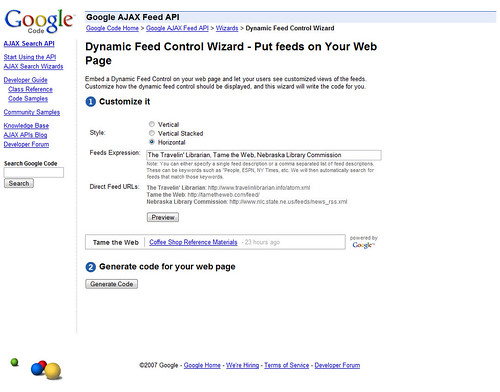
And here's the result:
I'll definitely be covering this tool in my RSS presentation at Internet Librarian this year.
Google AJAX Feed API - Dynamic Feed Control Wizard via RSS4LIB
posted by Michael @ 10:41 AM
0 Comments
I've got four computers I use regularly, two laptops and two desktops (one each at the office and at home). The desktops don't generally move but one or both laptops go with me on the road depending on the situation. Additionally my Cloudbook will be arriving soon (today hopefully). So, I might be sitting in front of any one of these computers and need to know what my calendar is. The four main machines all run Outlook while the Cloudbook won't. I've got a Google Calendar account but in the past you've not been able to (easily or completely) sync content between Outlook and Google calendars.
I had a partial solution in my Motorola Q smartphone but the Windows software would only let me sync with up to two computers (my office desktop and my home laptop) but that left out the other computers. I also have Web access to our Exchange server via Outlook Web access but to be honest, Outlook just isn't the same as a Web application. (And I'm doubting that it'll work well on the Cloudbook since it doesn't work all that well in Firefox on a Windows machine to begin with.)
So yesterday, I was VERY excited to hear that the folks over at Google had released their first version of Google Calendar Sync. This program is both simple and elegant. Download it from Google, and run the quick install. You'll then get this screen:
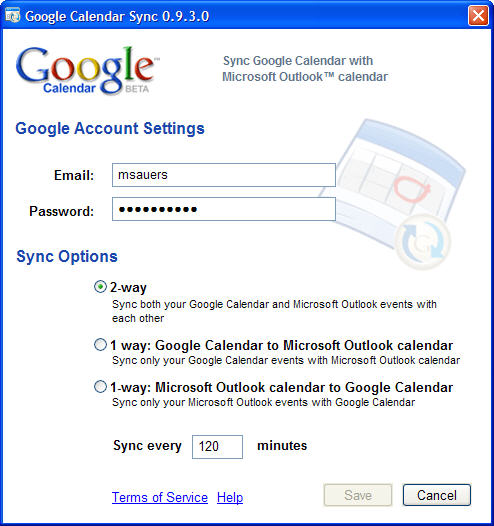
Enter your Google Calendar login information, then choose if you want to sync in both directions, just Google to Outlook, or just Outlook to Google. Lastly, set how often you'd like the content to re-sync and click Save.
The program will minimize to your system tray and sync your data. How much more simpler could it be?
I now have four copies of Outlook all with the same calendar along with my phone. Now, no matter which computer I have with me, I can enter a new appointment and shortly all of my other computers will have that same information.
posted by Michael @ 7:35 AM
1 Comments
Update: Turns out that you need to erase whatever you've written within 24 hours or it'll become permanent. Great for meeting rooms, poor for just leaving yourself notes in your office. (Thanks Allana)
posted by Michael @ 2:58 PM
3 Comments
Need a quick chart on your Web site and don't want to bother with creating it in Excel then exporting the image? Try the Google Chart API instead? Just build a URL, set it as an img source and see your results.
For example here's the code for a simple pie chart:
<img src=http://chart.apis.google.com/chart?
cht=p3&chd=s:hW&chs=250x100&chl=Cool|Not Cool />
and the results are:
Or how about a Venn diagram?
It gets way more complicated but this should give you a basic idea.
posted by Michael @ 9:12 AM
2 Comments
Unshelved has a great strip regarding using Google as a "source". Consider this a follow-up to my Google is not the Enemy post.
posted by Michael @ 9:29 AM
0 Comments
I've heard negative comments about Google before and I've not commented on it but I'm in a fightin' mood today so I'm going to say something this time.
Yesterday a presenter from an academic library made an off handed comments about how she "doesn't let" her students use Google. When questioned why not, she went on to explain that Google is "unreliable" and "doesn't use boolean" though it is "sort of built in." (I believe she was attempting to point out that boolean operators are not necessary when searching in Google but are typically necessary in professional databases.) Shortly thereafter she admitted to "sometimes cheating" by using Amazon.com to search for resources on a topic instead using library resources.
Anyone but me got a problem with that? Where to begin?
Well, let's see. Google is just another tool in a searcher's arsenal. Nothing more. Nothing less. For some things is may be exactly what the searcher needs to use. Sometimes, not. But to dismiss it out of hand because it doesn't require the use of boolean operators and that not all of the resources it finds are 100% reliable is intellectual arrogance to the n<sup>th</sup> degree.
If you've got a problem with the results that Google finds, teach your students to be skeptical and good information evaluators. Don't refuse to let them use the tool.
If you're upset that your students are using the resources we've paid tens of thousands of dollars for, you've got a marketing problem. That's not Google's fault, it's ours.
If, after the students are completely aware of the paid-for library resources and then still prefer to go to Google (or Amazon.com) first, then I'd blame the interfaces in those databases before I'd blame Google. People like simple. Google is simple. "Professional" databases are not.
If you don't like the fact that Google doesn't require a knowledge of boolean operators that's not Google's fault either. Google doesn't require them because <em>it works differently</em> than professional databases. Professional databases index things like title, author, abstract, article content, and a <em>controlled vocabulary</em>. Google does index content but it's hardly controlled and the relevance algorithm is centers around the number of links to that resource. Ok, it may be a popularity contest and you may not like that it is, but that's what seems to be working.
I'm not trying to say that boolean shouldn't be taught. I'm not saying that Google has all the answers. I'm not even saying that Google is always an appropriate tool for research. But none of that means that you should refuse to let someone use it. Really, when you're dealing with young people, isn't forbidding them from something just going to make them want to use it more?
posted by Michael @ 9:09 AM
8 Comments

Sponsor:
Need custom printed
library cards?
Visit RainbowLibraryCards.com
Sponsor:
Are your patrons
satisfied? Consider a
customer satisfaction survey.


